

Updated 1 Nov 2026 · Reviewed by Ahmed Tayeh, electrical engineer
What the voltage drop calculator does
The CableHero voltage drop calculator works out the voltage drop of a cable run in volts and percent, and checks it against the limit you set. It uses the same engine as the cable size calculator: the resistance and reactance from AS/NZS 3008.1.1:2025 at the conductor's actual operating temperature, your power factor, and the single-phase, three-phase or d.c. formula. Use it to check a cable you have already chosen or installed, to find how long a run a size can reach, or to share out the 5% voltage drop calculation in Australia between consumer mains, submains and final subcircuits.
It opens with the cable fixed by hand, so the drop you see is the drop of that size. Switch the size back to automatic and it becomes the full cable size calculator, choosing the smallest cable that meets the threshold and every other check.
Before you start
- The design current, or the power with its power factor.
- The supply (single phase, three phase or d.c.) and its nominal voltage: 230 V phase to neutral, 400 V phase to phase.
- The route length in metres, one way, along the actual path of the cable.
- The cable size, core type, conductor and insulation, and how it is installed.
- How much of the 5% this circuit may use after the circuits upstream of it.
How to calculate voltage drop step by step
- 1
Enter the load, supply and run length
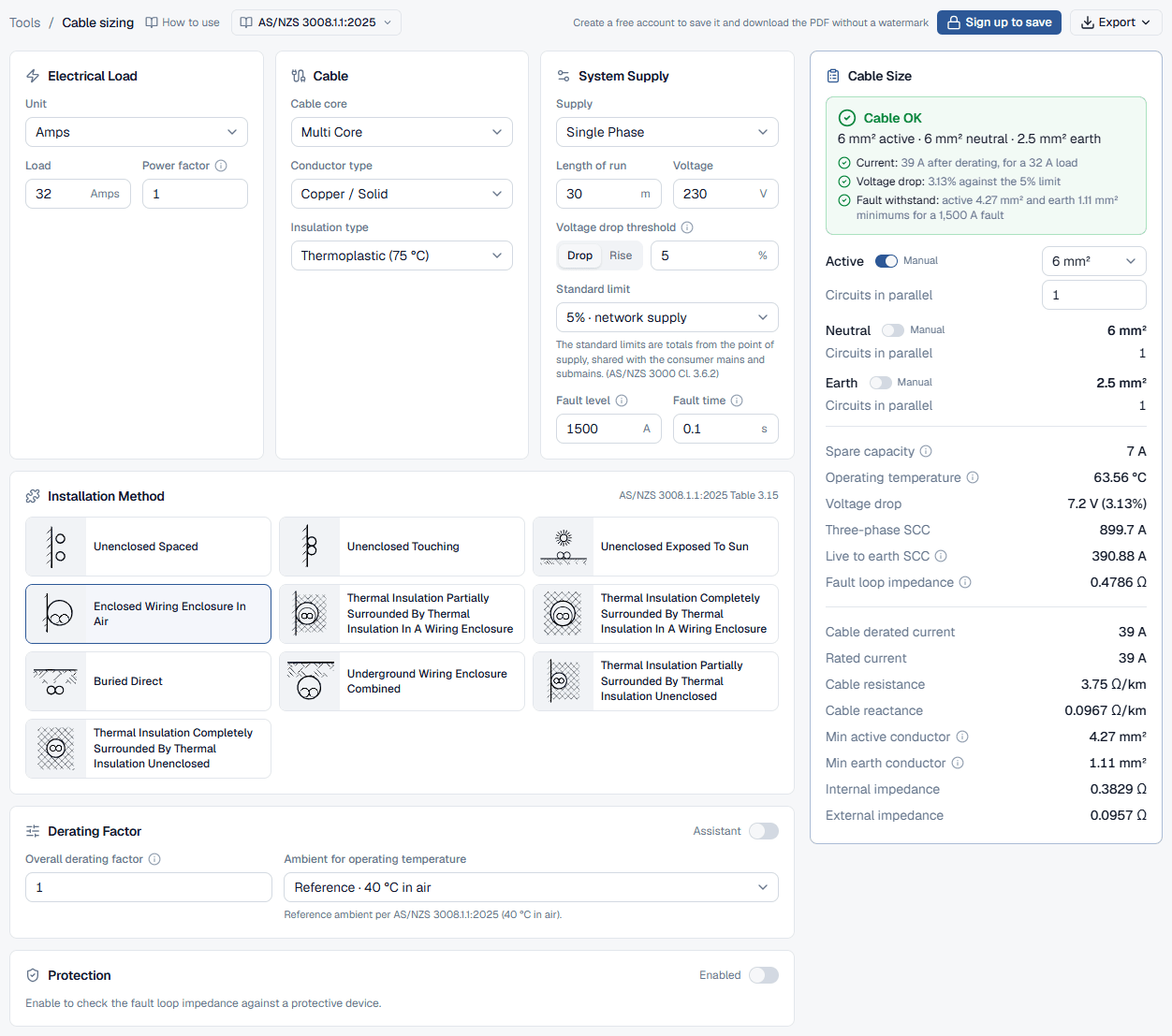
In Electrical Load set the Unit and type the Load. Set the Power factor for anything other than a resistive load. In System Supply choose the Supply, then enter the Length of run in metres and the Voltage. For a single-phase circuit enter 230 V even when it comes off a three-phase board.
- 2
Set the voltage drop threshold
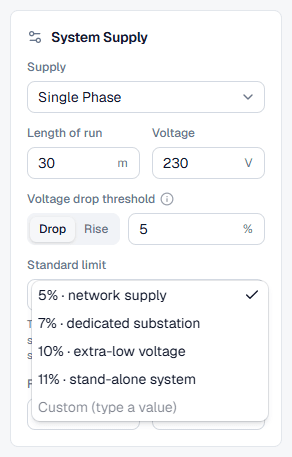
The Voltage drop threshold has Drop and Rise tabs; keep Drop for a load circuit. Type this circuit's allowance in percent, or pick a preset under Standard limit: 5% network supply, 7% dedicated substation, 10% extra-low voltage or 11% stand-alone system. The hint under it is a reminder that the presets are totals from the point of supply. Typing a value of your own shows the limit as Custom (type a value).
- 3
Describe the cable and how it is installed
In Cable choose the Cable core, Conductor type and Insulation type, then click the Installation Method picture and set the Derating Factor. These matter for voltage drop too: they decide how hot the conductor runs, and resistance rises with temperature. A heavily derated cable runs hotter and drops more.
If the circuit feeds socket-outlets or lighting spread along its length, enable Protection and turn on Distributed load (socket-outlets, lighting). The drop is then worked out at half the device rating, or at the load current if that is smaller.
- 4
Fix the active size by hand
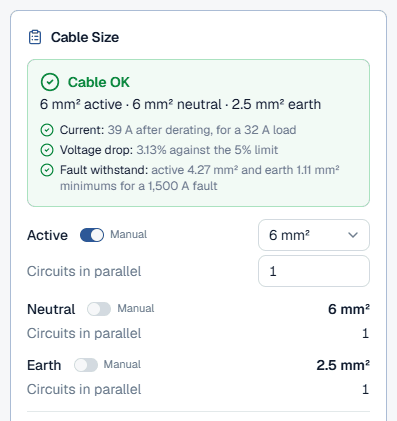
In the Cable Size result card, the Active row has a Manual switch. With it on, choose the size from the drop-down and type the Circuits in parallel. The neutral follows the active unless you set it by hand too. With Manual off, the calculator picks the smallest size that passes the threshold and every other check, and the voltage drop is that cable's.
- 5
Read the voltage drop
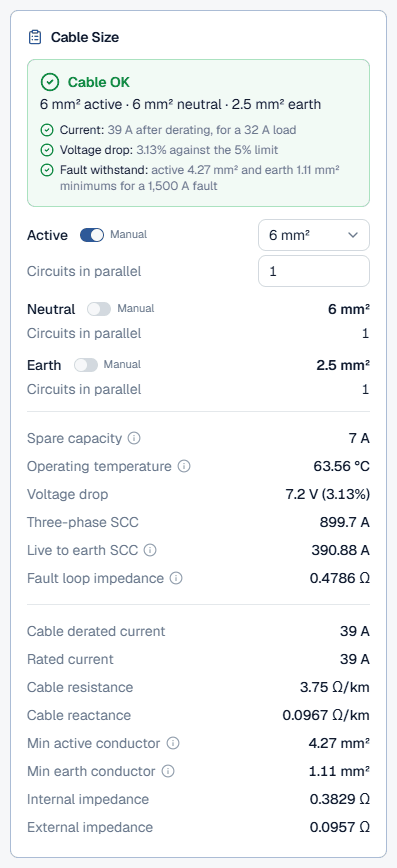
The summary's Voltage drop line gives the percentage against the threshold, green or red. The Voltage drop row gives volts and percent, and Operating temperature, Cable resistance and Cable reactance show what the figure was worked from.
Reading the voltage drop result
Read the voltage drop result together with the rows around it:
- Voltage drop: the drop over the route at the design current, in volts and as a percentage of the supply voltage you entered.
- Operating temperature: the estimated conductor temperature at this load. The calculator uses the resistance at this temperature, not at the insulation's maximum.
- Cable resistance and Cable reactance: in Ω/km. Multiply by the route length (and by two for the go and return of a single-phase circuit) to sanity-check the drop by hand.
- Voltage drop current (with the distributed-load allowance on): the current the drop was worked at.
With a manual size, look at the other checks too. A size that passes on voltage drop can still be too small for the current or the fault level, and the summary headline turns red to say so.
Worked example: 6 mm² at 32 A over 30 m
This is the circuit the public voltage drop calculator opens with: 32 A single phase at 230 V over 30 m of two-core copper cable, insulation Thermoplastic (75 °C), installation method Enclosed Wiring Enclosure In Air, power factor 1, with 6 mm² set by hand and a 5% threshold.
6 mm² is rated 39 A here, 7 A above the load, and runs at about 63.6 °C. At that temperature its resistance is 3.75 Ω/km and its reactance 0.0967 Ω/km, which is 6.5 mV/A.m three phase, or 7.5 mV/A.m single phase:
7.2 V is 3.13% of 230 V, inside the 5% threshold. The same cable reaches the threshold at about 48 m. Switch the active size to see the alternatives on the same run:
The 4 mm² row shows why a voltage drop check alone is not enough: at 4.68% it is within 5% on this run, but it is too small for the load, and the calculator flags its current check in red.
Voltage drop best practice (AS/NZS 3000 Clause 3.6.2)
Budget the 5% before you size anything. The standard does not say how to split it: you might give the consumer mains a small share, the submains another, and leave the rest for the final subcircuits, checking your distributor's rules for any limit on the mains. What matters is that the drops along any path add up to no more than the limit. Enter each circuit's share as its threshold, so a red result means the circuit is over its own budget, not just over 5%.
- mV/A.m and Ω/km: mV/A.m is the drop per amp per metre of route for the whole circuit; Ω/km is the impedance of one conductor. Do not mix them, and do not apply the 1.155 factor to a three-phase circuit.
- Power factor: the drop is Rc cos φ + Xc sin φ. On small cables resistance dominates and a power factor of 1 is the worst case; on large cables the reactance is a bigger share and a lagging power factor can raise the drop. Enter the load's real power factor.
- Temperature: copper's resistance rises about 0.4% per °C. A grouped cable in a hot roof space runs hotter and drops more than the same cable on its own.
- Motors: check the drop on starting current too, which can be several times the running current, if the motor or the supply is sensitive to it.
Common voltage drop mistakes
Using the three-phase figure for a single-phase circuit
Tabulated mV/A.m values are three phase. A single-phase circuit drops 1.155 times as much. Choose Single Phase under Supply and the calculator applies it.Working the percentage on 400 V for a 230 V circuit
A single-phase circuit off a three-phase board is a 230 V circuit. The same volts dropped is a much bigger share of 230 V than of 400 V.Measuring the run on the plan
Enter the route length: up and down walls, around obstructions, plus the tails at each end. A straight-line measurement can be well short.Giving one subcircuit the whole 5%
The limit is a total from the point of supply. Subtract the consumer mains' and submains' share and use the rest.Checking voltage drop only
A size that passes on voltage drop can fail on current, fault level or fault loop. Read the whole summary.