

Updated 1 Nov 2026 · Reviewed by Ahmed Tayeh, electrical engineer
What the cable size calculator does
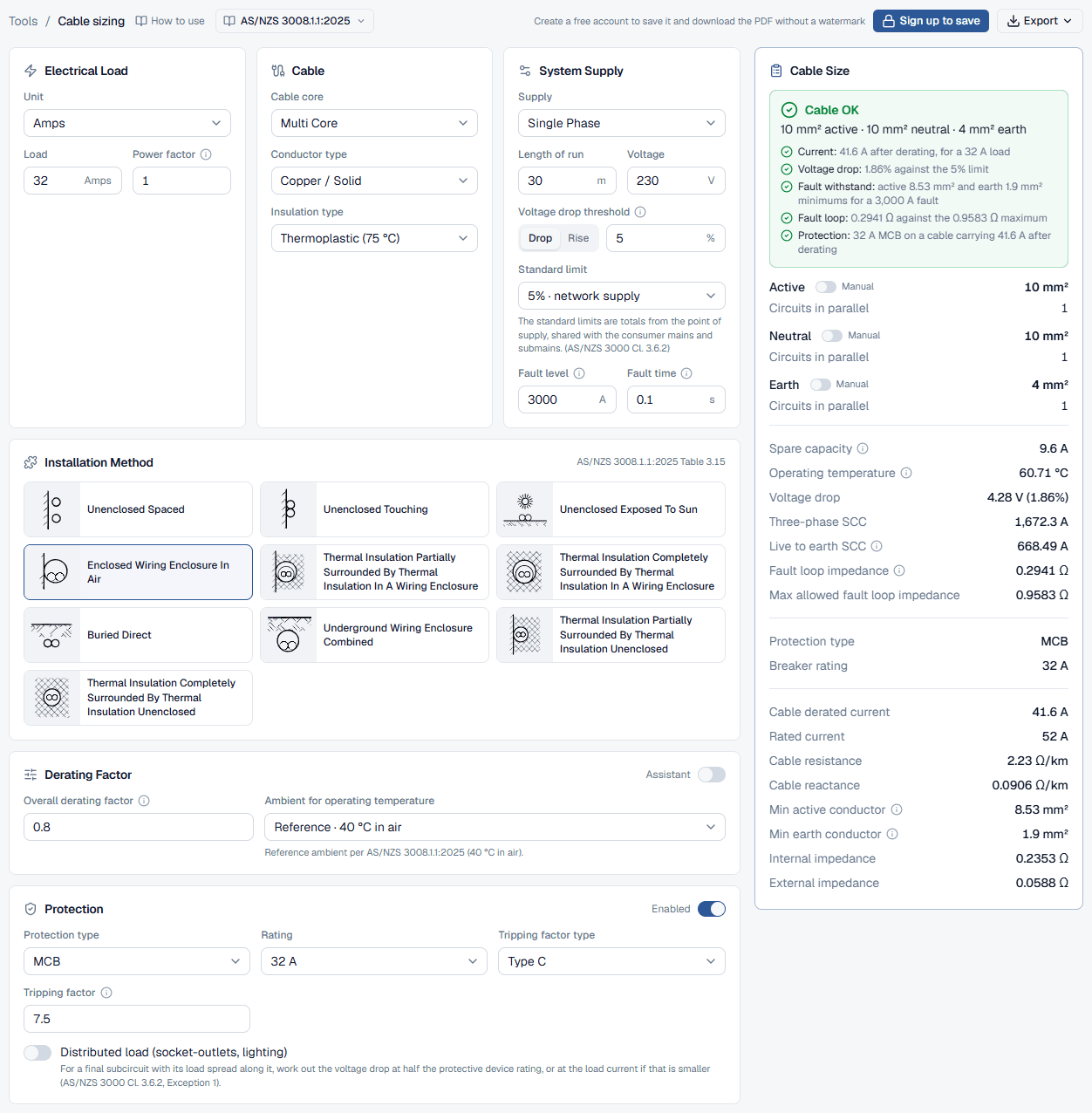
The CableHero cable size calculator picks the smallest cable that carries your load and meets every check in AS/NZS 3008.1.1:2025 and AS/NZS 3000:2018: current-carrying capacity after derating, voltage drop, short-circuit withstand of the active and earth, and fault loop impedance with the protective device. You enter the circuit once, and it reads the right current rating table for your cable and installation, works out the conductor operating temperature, and steps the size up until everything passes. This guide walks through each card of the calculator, explains how to read what comes back, and works one circuit through from start to finish.
Use it for final subcircuits, submains and consumer mains, single phase, three phase or d.c., in copper or aluminium. It is the same engine as the CableHero app, so the answer on the public page is the one a saved calculation and its PDF report give. If you only need one part of the job, the voltage drop guide covers checking a cable you have already chosen, and the voltage rise guide covers solar inverter cables.
Before you start: what to collect
Have these to hand before you start. Everything else has a sensible default you can come back to.
- The load: the design current in amps, or the power in W, kW or HP with its power factor (and efficiency for a motor).
- The supply: single phase (230 V), three phase (400 V) or d.c., and the route length of the cable in metres, measured along the path it takes, not on the plan in a straight line.
- Your voltage drop budget: how much of the installation's 5% this circuit may use once the consumer mains and submains upstream have taken their share.
- The fault level and clearing time: the prospective short-circuit current where the cable starts (from the distributor or the upstream calculation) and how long the protective device takes to clear it.
- The cable: single-core or multicore, copper or aluminium, and the insulation (V-75 thermoplastic, X-90 XLPE and so on).
- How it is installed: in air, in conduit, in thermal insulation or underground; how many other circuits run with it; the ambient or soil temperature; and for buried cables the depth and soil thermal resistivity.
- The protective device: MCB or MCCB, its rating and its curve (Type B, C or D).
How to calculate cable size step by step
The cards are laid out in the order a designer thinks about the circuit. The result updates as soon as you change a field, so you can work down the cards and watch the size and checks move.
- 1
Enter the electrical load
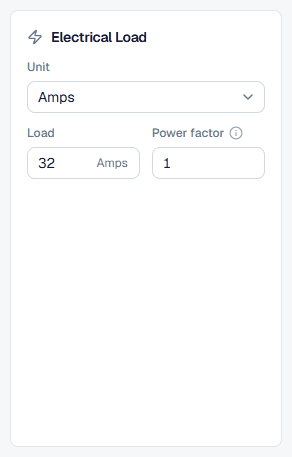
In Electrical Load, choose the Unit: Amps, Watts, kW or HP. Type the Load and set the Power factor. For anything other than amps the card shows the current it works out underneath, so you can check it. HP adds an Efficiency field in percent.
The power factor matters twice: it converts kW to amps, and it decides how much of the cable's reactance adds to the voltage drop. Use 1 for heaters and other resistive loads, and the nameplate or a realistic 0.8 to 0.9 for motors. The calculator starts at 1, which is right for a load entered in amps when you have no better figure. For d.c. on the 2025 edition the field is greyed out, because d.c. voltage drop uses resistance only.
- 2
Set the system supply
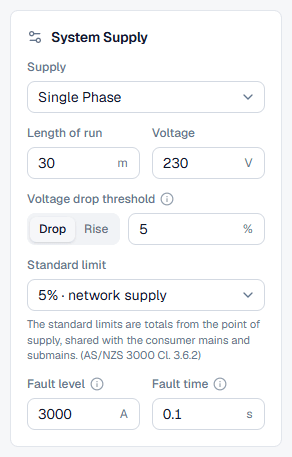
In System Supply, choose the Supply: Single Phase, Three Phase or DC. DC adds a PV array circuit switch for solar string and array cables. Enter the Length of run in metres and the Voltage (230 V single phase, 400 V three phase).
The Voltage drop threshold is this circuit's share of the limit, in percent. The Drop and Rise tabs beside it switch between a load circuit and an inverter circuit. Under it, Standard limit offers the presets from AS/NZS 3000:2018: 5% for a network supply, 7% for a dedicated substation, 10% for extra-low voltage and 11% for a stand-alone system. Picking one fills the threshold; typing your own value shows it as Custom. Those limits are totals from the point of supply, so on a final subcircuit you would usually type a smaller figure than 5%.
Fault level is the prospective short-circuit current in amps where this circuit starts, and Fault time the time in seconds the protective device takes to clear it. Together they set the smallest active and earth conductors that survive the fault. The calculator starts at 3,000 A and 0.1 s; replace both with your site's figures.
- 3
Choose the cable
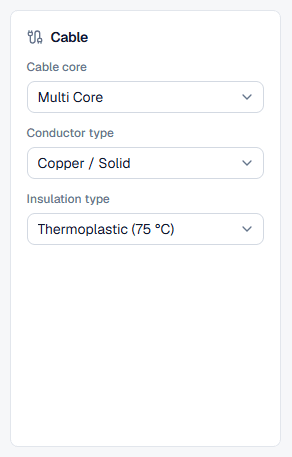
In Cable, choose the Cable core (Single Core or Multi Core), the Conductor type (Copper / Solid, Copper / Flex or Aluminium, as the current rating table allows for the installation) and the Insulation type, such as Thermoplastic (75 °C) for V-75 or XLPE or Elastomer (90 °C.) for X-90. Together with the supply these pick the AS/NZS 3008.1.1:2025 current rating table, which the Installation Method card names in its header.
- 4
Pick the installation method
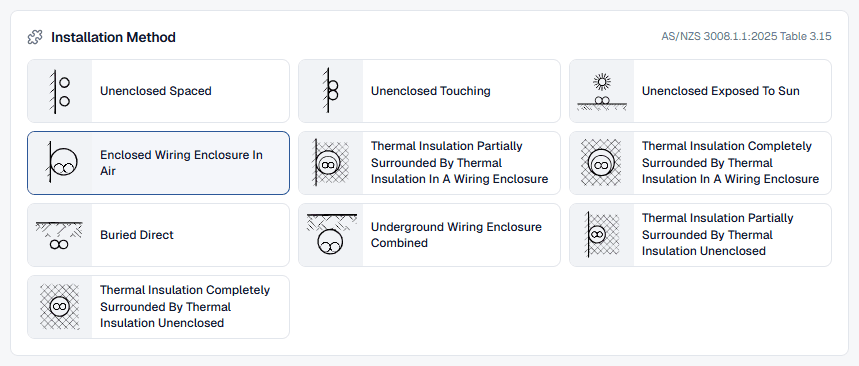
Installation Method shows a picture for every column of the selected table. Click the one that matches the worst stretch of the route; the next section explains how to choose. The pictures change with the cable core and supply, because each table has its own columns.
- 5
Set the derating factor
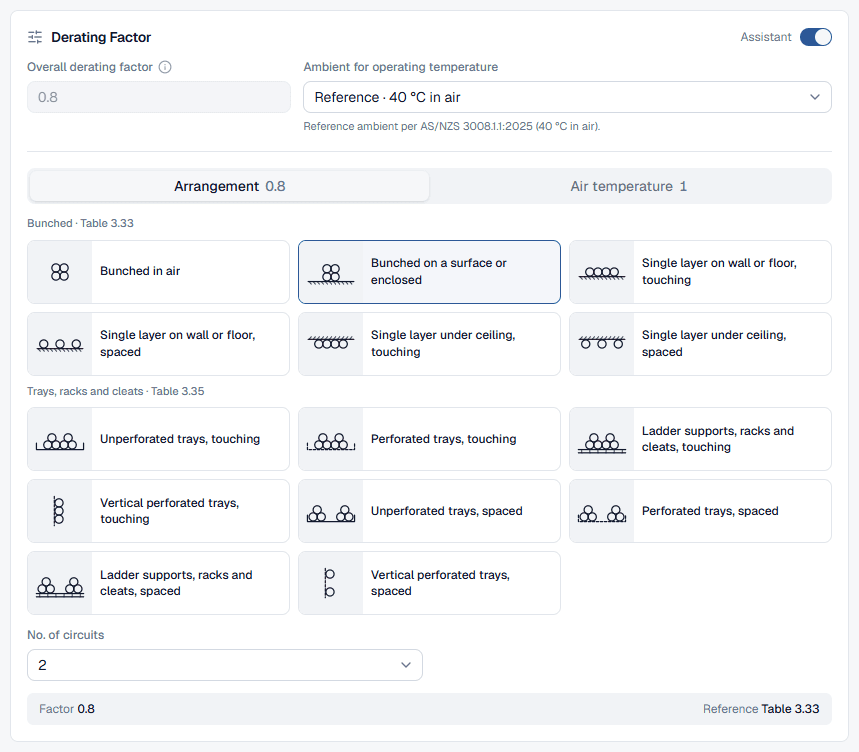
Derating Factor holds the Overall derating factor that multiplies the tabulated rating. Type it if you have worked it out, or switch on the Assistant in the card header to build it from the tables. With the assistant on, the overall factor is the product of the tabs below it and the field is locked. Beside it, Ambient for operating temperature chooses the reference ambient (40 °C in air, 25 °C in the ground) or an actual temperature you enter.
- 6
Add the protective device
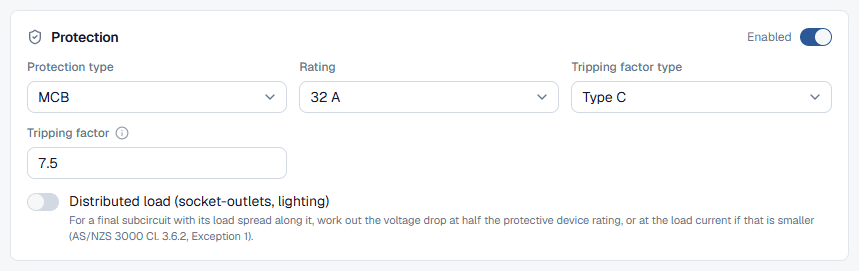
Switch Protection to Enabled to check the circuit against its device. Choose the Protection type (MCB, MCCB or Manual), the Rating and the Tripping factor type. The section on protection below covers each field.
- 7
Read the results
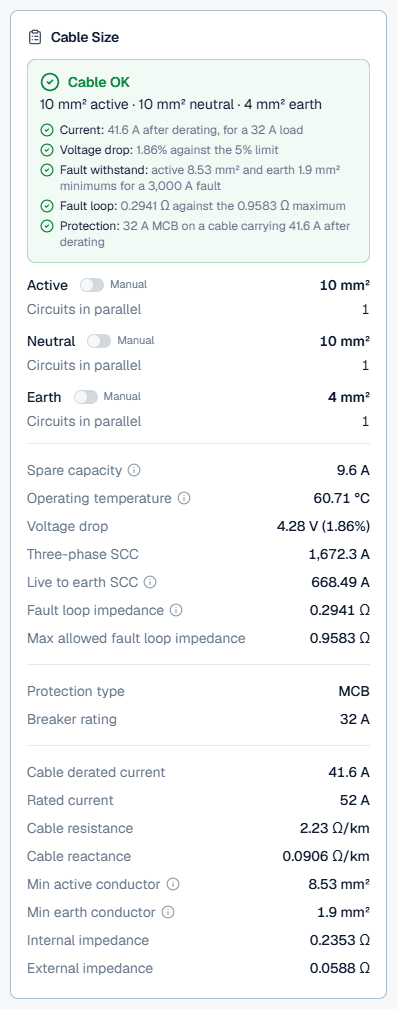
The Cable Size card on the right (pinned to the bottom of the screen on a phone) gives the answer: a green Cable OK headline or a red one naming what failed, the sizes, and the numbers behind every check. See reading the results.
- 8
Save and export
On the public page, Sign up to save carries your load, length, supply and conductor into a new calculation, and Export downloads a watermarked PDF. In the app the header holds the calculation's name (a blank name saves as "New calculation") and description, New, Conduit check, Check coordination and Export with Download PDF and Preview and print. The PDF lists every input, result and the AS/NZS table behind each number. Calculations save automatically as you work.
Which installation method picture to choose
The installation method decides which column of the current rating table the calculator reads, and the columns differ a lot: a cable in thermal insulation can carry well under half of what the same cable carries spaced in free air. The pictures fall into a few families:
- Unenclosed in air: clipped or laid on a surface, touching it or spaced from it, and a separate picture for cables exposed to sun. Spaced cables cool best and rate highest.
- Enclosed: in conduit, trunking or another wiring enclosure in air (Enclosed Wiring Enclosure In Air in the picker). The usual choice for cables in conduit on a wall or in a ceiling space.
- In thermal insulation: partially or completely surrounded, enclosed or not. Choose these where a cable runs through ceiling or wall insulation; completely surrounded is the most severe and rates lowest.
- Underground: Buried Direct, or in underground wiring enclosures (one enclosure for all cores, or separate enclosures). These switch the derating assistant to its underground tabs and the reference ambient to 25 °C soil.
Pick the method of the worst part of the route, not the longest. A cable that runs 40 m in free air and 2 m through ceiling insulation is limited by those 2 m, because the conductor heats up where it cannot lose heat.
Derating assistant: grouping, temperature, depth and soil
With the Assistant on, the Derating Factor card shows one tab per factor, each with its current value in the tab, so you can read them all at a glance. The overall factor is their product.
In air: Arrangement and Air temperature
Arrangement shows pictures grouped under Bunched and Trays, racks and cleats, each headed by its table: Bunched in air, Bunched on a surface or enclosed, single layers on a wall, floor or under a ceiling, and the tray, ladder and cleat arrangements. Pick the picture, then No. of circuits (and No. of rows for trays). Count circuits, not cores: a two-core and earth cable is one circuit, and so is a set of three single-core cables for one three-phase circuit.
Air temperature takes the Ambient temperature in °C; Conductor max. temperature is shown from the insulation and cannot be edited. Leave it at 40 °C unless the cable runs somewhere hotter, such as a roof space in summer or beside a heat source.
Underground: Buried groups, Soil temperature, Depth of laying, Soil resistivity
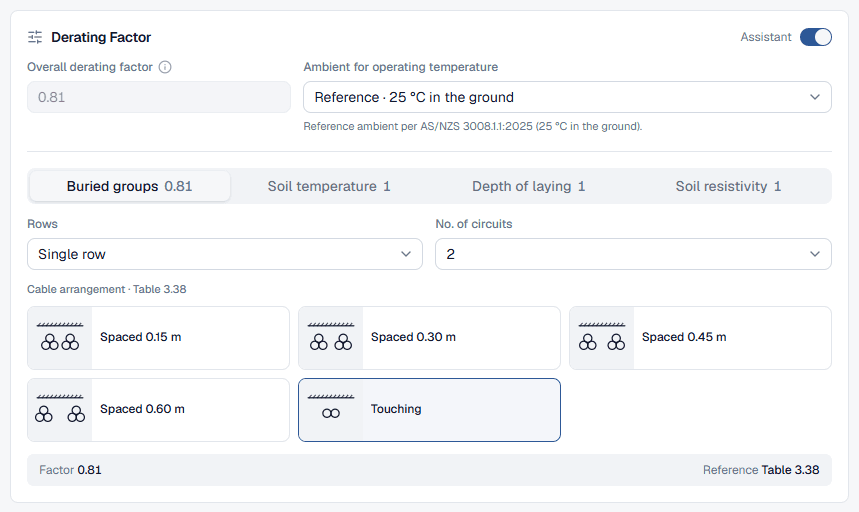
For a buried or underground-enclosure installation the tabs change. Buried groups takes the arrangement, Rows and No. of circuits; Soil temperature the soil temperature; Depth of laying the Depth of burial in metres and the Conductor size band; and Soil resistivity the Soil thermal resistivity in °C·m/W and the Method of installation. Use measured soil resistivity where you have it; dry sandy or backfilled ground is often worse than the standard's reference.
Protection and fault loop impedance
Protection is optional, but turn it on for any real design: without it the fault loop impedance has nothing to be checked against.
- Protection type: MCB, MCCB or Manual. Manual is for a fuse or another device; it adds a Protection name and a typed rating.
- Rating: the calculator offers the ratings at or above the load and snaps to the nearest one when the load changes. Ratings below the load are greyed out.
- Tripping factor type and Tripping factor: the multiple of the rating that trips the device instantly on a fault. The calculator fills in 4 for Type B, 7.5 for Type C and 12.5 for Type D. These are the calculator's defaults, not values taken from the standard; check them against the manufacturer's curves and edit the factor if your device differs.
- Manual tripping current (MCCB and Manual): the current setting of an adjustable device. It must not be smaller than the load.
- Distributed load (socket-outlets, lighting): for a final subcircuit whose load is spread along it, works out the voltage drop at half the device rating, or at the load current if that is smaller.
With a device set, the calculator works out the maximum fault loop impedance the device allows and compares the circuit's own impedance with it. If the cable that passes everything else is still too long for the device to trip in time, it steps the active (and with it the earth) up until the fault loop passes, and a note on the result says so. The cable is also checked against the device: its derated rating must be at least the device rating, so the device protects it from overload.
Reading the cable sizing results
The Cable Size card starts with a summary: Cable OK in green when every check passes, or a red headline naming the check that failed, with the sizes underneath. Below it, one line per check:
- Current: the cable's rating after derating against the load, and whether the conductor runs over its maximum temperature.
- Voltage drop (or Voltage rise): the percentage against your threshold.
- Fault withstand: the minimum active and earth sizes for the fault level and time.
- Fault loop and Protection: with a device set, the impedance against its maximum and the device against the cable's derated rating.
Then the conductors. Active, Neutral and Earth each show a size and Circuits in parallel, with a Manual switch. Turn Manual on to set a size yourself, for example to check a cable that is already installed; the checks then judge your choice instead of picking one. A neutral or earth smaller than the active is flagged. The calculator adds parallel runs on its own when one cable is not enough, and warns when parallel runs have not been derated for each other.
The result rows give the detail:
Worked example: 32 A over 30 m in conduit
This is the circuit the public calculator opens with, so you can follow along. Every number below is the calculator's own answer to these inputs.
Current-carrying capacity
A two-core V-75 cable enclosed in conduit reads Table 3.15. The next size the calculator considered and rejected was 6 mm²: rated 39 A, it derates to 31.2 A with the grouping factor of 0.80, which is less than the 32 A load and the 32 A device. It also failed short-circuit withstand: at 3,000 A for 0.1 s the active has to be at least 8.53 mm². 10 mm² is rated 52 A and derates to 41.6 A, leaving 9.6 A spare.
Voltage drop
At 41.6 A of capacity carrying 32 A, the conductor runs at about 60.7 °C, where its resistance is 2.23 Ω/km and its reactance 0.0906 Ω/km. Over 30 m that gives a drop of 4.28 V, or 1.86% of 230 V, well inside the 5% threshold. The same cable would reach the threshold at about 81 m.
Earth, fault currents and fault loop
The earth is 4 mm², from AS/NZS 3000:2018 Table 5.1 for a 10 mm² active, and comfortably above the 1.9 mm² minimum for the earth fault. At the far end the prospective three-phase fault current is 1,672 A and the live-to-earth fault current 668 A. The Type C device trips instantly at 7.5 × 32 A = 240 A, so the maximum fault loop impedance is 230 V ÷ 240 A = 0.9583 Ω. The circuit's Zs is 0.2941 Ω, so the fault loop passes, with room for a run up to about 98 m before it would not.
Cable sizing best practice (AS/NZS 3008 and 3000)
These are the rules the calculator applies, and the judgement calls it leaves to you. Clause numbers are for AS/NZS 3008.1.1:2025 and AS/NZS 3000:2018.
- Size to the device, not just the load: a cable protected by a 32 A device needs a derated rating of at least 32 A even if the load is 25 A.
- Round the route length up and add the vertical runs and the tails at each end.
- Use the hottest realistic ambient along the route, not the average.
- Keep aluminium to the larger sizes: the standard rates aluminium conductors from 16 mm².
- Save the calculation with a description that names the circuit, so the PDF report doubles as your design record.
Common cable sizing mistakes
Entering kW without a power factor
A 7 kW motor at 0.8 power factor draws a quarter more current than the same kW at 1. Set the Power factor before trusting the size.Using the whole 5% on one subcircuit
The 5% in AS/NZS 3000:2018 Clause 3.6.2 is the total from the point of supply. Subtract what the consumer mains and submains use and enter the remainder as the threshold.Forgetting grouping
Several circuits in one conduit or bunched on a tray heat each other. Turn on the Assistant and count the circuits in the Arrangement tab; it often sets the size on its own.Picking the wrong installation picture
A cable rated for free air but run through ceiling insulation can be credited with about twice what it can carry when completely surrounded. Pick the picture for the worst part of the route.Guessing the fault level
The fault level sets the minimum active and earth sizes. A low guess passes cables that cannot survive the fault; get the figure from the distributor or the upstream calculation.Aluminium below 16 mm²
The current rating tables give aluminium from 16 mm². For smaller circuits use copper.Setting the earth by hand and forgetting it
A Manual earth stays where you put it when the active grows. Check it against Table 5.1 and the Min earth conductor row, or switch Manual off.