
Updated 1 Nov 2026 · Reviewed by Ahmed Tayeh, electrical engineer
What the conduit size calculator does
Conduit fill is the share of a conduit's internal area taken up by the cables in it. AS/NZS 3000:2018 Appendix C caps it with a space factor so the cables can be pulled in without damage and can shed heat. The free conduit size calculator answers the two questions that come up on every job: how many cables of one size fit in this conduit, and what is the smallest conduit for this set of cables.
It has three methods, each a tab in the Method card:
- Lookup reads the maximum number of cables from the AS/NZS 3000:2018 Appendix C capacity tables for a standard conduit, cable size and insulation.
- Sizing takes a mix of cables by overall diameter and quantity and checks every size of a conduit type against its bore, returning the smallest that fits.
- Detailed is the geometric method for any conduit bore and cable diameter, with the space factor you choose.
Size the cables first with the cable size calculator; the conduit follows from the cables you chose, never the other way round.
Before you start: cable diameters and the conduit
- The cables. For Lookup: conductor size, single-core or multi-core, insulation and whether the circuit is single phase, three phase or DC. For Sizing and Detailed: each cable's overall diameter from the datasheet, and how many of each.
- The conduit. The type you will install (heavy duty rigid UPVC, medium duty rigid UPVC, medium duty corrugated or Corflo) and, for Detailed, its internal diameter (bore) from the manufacturer's datasheet.
- Every conductor in the run, including neutrals and earths when they are separate single-core cables, and any spare cable you plan to pull in later.
How to calculate conduit fill, step by step
- 1
Pick the method
The Method card at the top has three tabs: Lookup, Sizing and Detailed. The hint under them says what the active method does. Each tab keeps its last result, so you can switch between them to compare. Signed in on the public page, a Save to project list sits above the tabs.
- 2
Lookup: choose the cable and the conduit
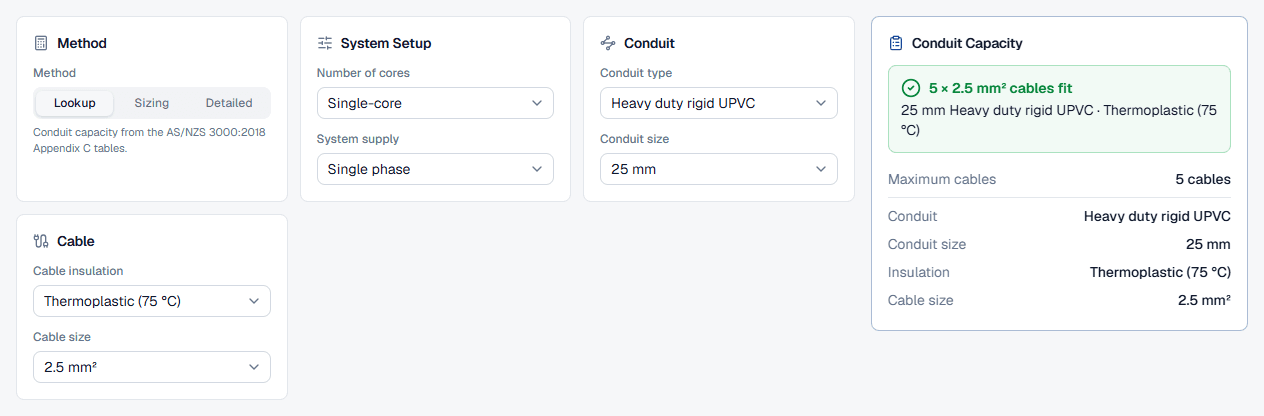
In System Setup, choose Number of cores (Single-core or Multi-core) and System supply (Single phase, Three phase or Direct current). In Conduit, pick the Conduit type and Conduit size in mm. In Cable, pick the Cable insulation and the Cable size in mm².
The Conduit Capacity card fills in shortly after the last choice; there is no Calculate button. Inside a project a From a Cable Calculation card can pre-fill the cable fields from a saved cable sizing calculation.
- 3
Sizing: list the cables
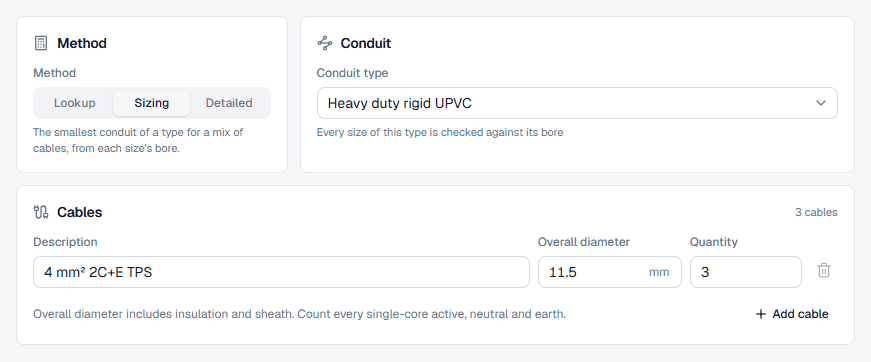
Choose the Conduit type; the hint reminds you that every size of the type is checked against its bore. In the Cables card each row has a Description (optional, it appears in the report), the Overall diameter in mm and the Quantity. Add cable adds a row for another diameter; the card header counts the cables.
- 4
Detailed: enter the bore and the cable diameter
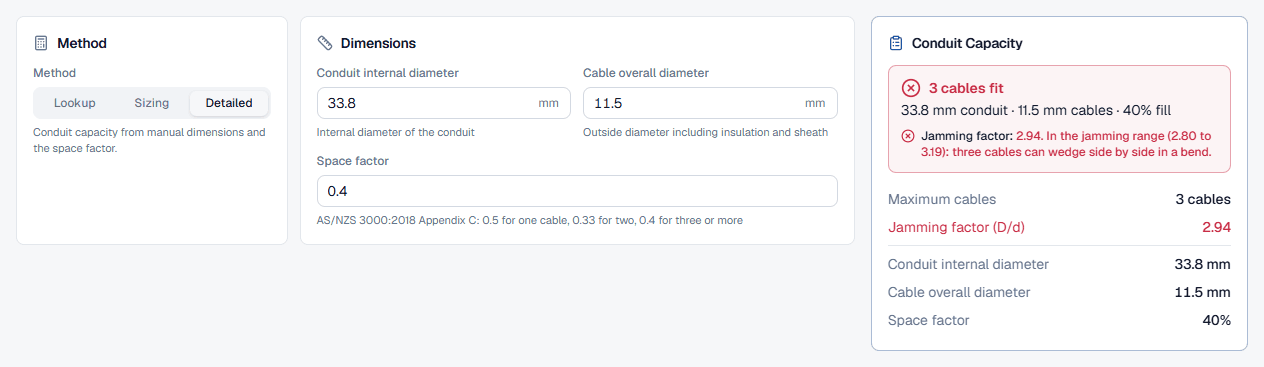
The Dimensions card takes the Conduit internal diameter in mm, the Cable overall diameter in mm and the Space factor, which starts at 0.4. Its hint lists the Appendix C values: 0.5 for one cable, 0.33 for two, 0.4 for three or more. Use Detailed for conduit types or cables the tables do not cover.
- 5
Read the result
Every method answers on the right as you type. The next section goes through each result card.
- 6
Save or export
Without an account, Export downloads a watermarked PDF of the result on screen and Sign up to save opens registration. In a project, give the calculation a name and description in the header (for example 6 × 35 mm² XLPE in 50 mm conduit, pit P1 to P2); it saves automatically, and Export offers Download PDF and Preview and print.
Reading the conduit fill result
Lookup: Conduit Capacity
The headline reads like 5 × 2.5 mm² cables fit, with the conduit and insulation underneath, then rows for Maximum cables, conduit, size, insulation and cable size. When no cable of that size fits, the headline says Does not fit and a note offers up to two larger sizes of the same type that do, as links that switch the size for you.
Sizing: Conduit Size
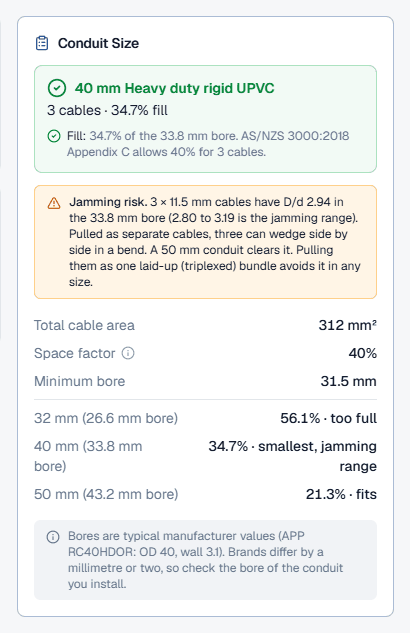
The headline is the smallest conduit of the type within the space factor, with the cable count and the fill under it. The Fill check states the fill against the bore and the limit; a Jamming check appears when three or more equal cables are present. Below that: Total cable area, Space factor, Minimum bore, and the sizes either side of the answer marked too full, smallest that fits, fits or jamming range. If nothing of the type is big enough, the card gives the bore the cables need and suggests another type or splitting the cables.
Detailed: Conduit Capacity
The headline is the number of cables that fit, and the Jamming factor check gives D/d with its verdict: clear at 3.20 and above, in the jamming range from 2.80 to 3.19, and check clearance below 2.80. Unlike Sizing, the Detailed tab marks a jamming ratio as a failed check.
Worked example: three TPS cables in one conduit
Three 4 mm² 2C+E TPS cables, 11.5 mm overall, in heavy duty rigid upvc conduit. On the Sizing tab choose Heavy duty rigid UPVC, enter one row with Overall diameter 11.5 mm and Quantity 3. The result card reads 40 mm Heavy duty rigid UPVC, 3 cables · 34.7% fill:
The 40 mm conduit meets the 40% space factor, but its bore divided by the cable diameter is 2.94, inside the jamming range, so the card adds a Jamming risk note: pull the three cables as one laid-up bundle, or step up to 50 mm (D/d 3.76).
Check it on the Detailed tab: enter the 33.8 mm bore, 11.5 mm cables and a 0.4 space factor. The answer is 3 cables fit with a jamming factor of 2.94, marked as in the jamming range. Same cables, same conclusion.
And a table lookup: on the Lookup tab, single-core, single phase, 25 mm heavy duty rigid UPVC, Thermoplastic (75 °C), 2.5 mm² gives 5 × 2.5 mm² cables fit.
Best practice and the AS/NZS 3000 space factor
- Use the overall diameter, not the conductor size. Fill is about the space the whole cable takes, insulation and sheath included.
- Use the bore, not the nominal size. Nominal conduit sizes up to 63 mm are the outside diameter, so a 50 mm heavy duty conduit has a bore of about 43 mm. The Sizing tab uses manufacturer bores for you; in the Detailed tab enter the bore yourself.
- Jamming is pulling practice. Three equal cables can wedge side by side in a bend when D/d is about 2.8 to 3.2. It is not an AS/NZS 3000 rule, which is why the Sizing tab warns rather than rejecting the size. On long runs with several bends, also check pulling tension with the cable pulling calculator.
- Leave room for change. A conduit at its limit cannot take another circuit. Where extension is likely, pick the next size or run a spare conduit.
- Fill does not cover derating. Several circuits in one conduit are a group, and their current rating drops; apply the grouping factor in the cable size or cable derating calculator.
Common conduit fill mistakes
Entering mm² as the diameter
A 4 mm² cable is not 4 mm across. Enter the overall diameter in mm from the datasheet.Using the nominal conduit size as the bore
In the Detailed tab, a 25 mm conduit's bore is smaller than 25 mm. Use the manufacturer's internal diameter.Forgetting the earth and neutral
Separate single-core neutrals and earths take space. Count them in the quantity.Keeping 0.4 for one or two cables
The Detailed tab starts at 0.4. For one cable use 0.5; for two use 0.33.Ignoring the jamming warning
Three cables pulled separately through a bend in the jamming range can wedge and be damaged. Bundle them or go up a size.Reading the lookup for another cable
The lookup is for one cable size and type at a time. For a mix of sizes use Sizing.