
Updated 1 Nov 2026 · Reviewed by Ahmed Tayeh, electrical engineer
What the PV string voltage calculator does
The free PV string voltage calculator works out the voltage of a string of solar modules wired in series, at standard test conditions (STC) and at the coldest and hottest temperatures your site will see. It then checks every one of those voltages against the maximum PV array voltage for the site type, the limits drawn from AS/NZS 5033:2021. This guide walks through each field, explains how to read the String Voltages card and shows a worked example of a PV string voltage calculation from a real datasheet.
Use it whenever you choose how many modules go in a string:
- sizing strings for a new inverter, before you lock in the array layout;
- checking an existing design after a module substitution, because a different Voc or temperature coefficient changes the answer;
- moving a design to a colder site, where the same string can cross the limit on a frosty morning.
It does not size the DC cable or the AC cable. For the inverter's AC run use the voltage rise calculator, and for the cable itself the cable size calculator.
Before you start: the datasheet and site data
Collect four numbers from the module datasheet and three from the site before you open the calculator:
- Vmp and Voc at STC: the maximum power voltage and the open-circuit voltage, both in volts, from the electrical table at 1000 W/m² and 25 °C cell temperature. Do not use the NOCT or NMOT rows.
- Temperature coefficients of Voc and of Vmp, in %/°C. Many datasheets give the coefficient of Pmax rather than Vmp; it is the usual stand-in. If a coefficient is printed in mV/°C, divide it by Voc and multiply by 100 to get %/°C.
- Minimum and maximum temperature for the site in °C. The minimum is the coldest morning on record near the site; the maximum is the hottest you design for.
- String length: the number of modules connected in series in one string.
- Site type: Domestic or Commercial, which sets the voltage limit the string is checked against.
Step by step: calculating PV string voltage
The calculator has two input cards on the left and one result card on the right. Results update a moment after you stop typing; there is no Calculate button.
- 1
Enter the module specifications
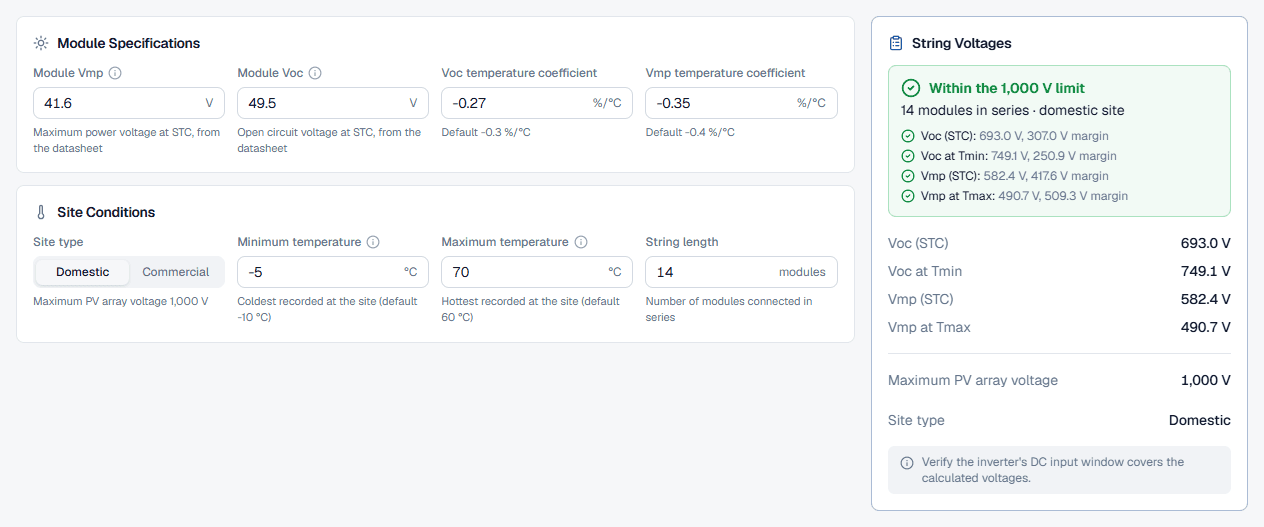
In the Module Specifications card fill in Module Vmp and Module Voc in volts. Both are required: nothing appears in the results until they and the string length are in. Then enter the Voc temperature coefficient and Vmp temperature coefficient in %/°C, including the minus sign. The info icon beside Vmp and Voc reminds you that both are STC values.
- 2
Set the site conditions
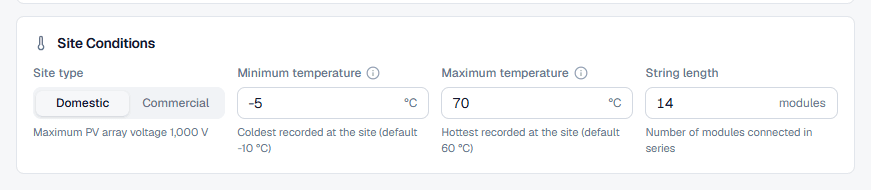
In Site Conditions choose the Site type tab. The hint under it shows the limit in force: 1,000 V for Domestic and 1,500 V for Commercial. Enter the Minimum temperature (Tmin) and Maximum temperature (Tmax) in °C, then the String length in modules. If the minimum is not below the maximum the field shows an error and the result clears.
- 3
Read the string voltages
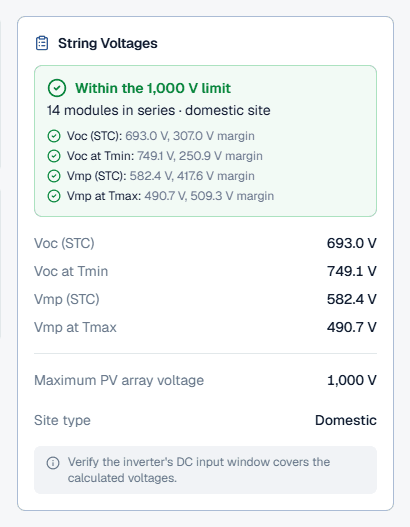
The String Voltages card fills in as soon as the required fields are complete. The next section explains each line.
- 4
Save the calculation
On the public page anyone can run the calculator without an account. Signed in, a Save To card appears so you can pick the project, and the header gains a name and a description (for example “Roof array A, 12 modules per string”). After the first save the calculation autosaves as you edit. The free tier saves one string voltage calculation.
Reading the string voltage results
The result card is built the same way as every CableHero calculator: a headline, one line per check, then the values.
- The headline reads “Within the 1,000 V limit” (or the commercial figure) when the string passes, and counts the failing checks when it does not. Under it the subtitle repeats the string length and site type.
- Voc (STC) and Vmp (STC): modules in series times the datasheet values. These are nameplate figures only.
- Voc at Tmin: the open-circuit voltage on the coldest morning. This is the highest voltage the string produces and the one that decides the limit check, the inverter's maximum DC input and the voltage rating of DC switches and cable.
- Vmp at Tmax: the operating voltage on the hottest afternoon, the lowest the string runs at. Keep it above the bottom of the inverter's MPPT range or the inverter will clip or drop out in summer.
- Maximum PV array voltage and Site type: the limit the result was checked against. If you switch the site type tab, the result recalculates against the new limit.
Each check line gives the margin to the limit. A margin under 10 % of the limit is marked “close to the limit”: it still passes, but there is little room for a colder morning than the one you entered. Over the limit, the row turns red and a note asks you to review the string length or module choice. When the string passes, the note reminds you to check the inverter's DC input window, which the calculator does not know.
Worked example: how many modules fit in a string
Take a domestic string of 14 modules with Voc 49.5 V, Vmp 41.6 V, a Voc coefficient of -0.27 %/°C and a Vmp coefficient of -0.35 %/°C, on a site that ranges from -5 °C to 70 °C. Enter those values and the card shows:
- Voc (STC) 693.0 V and Vmp (STC) 582.4 V;
- Voc at Tmin 749.1 V, 8.1 % above the STC figure, leaving a 250.9 V margin to the 1,000 V limit;
- Vmp at Tmax 490.7 V, 15.8 % below the STC figure.
The string passes. Now find the longest string the site allows. On a -5 °C morning each module reaches 53.51 V, so raise the String length one module at a time and watch the Voc at Tmin row:
- at 18 modules it reads 963.2 V, a 36.8 V margin, flagged as close to the limit;
- at 19 modules it reads 1016.7 V and the check fails.
So 18 modules is the most this module allows on a domestic site. Switch the site type to Commercial and the same method gives 28 modules against the 1,500 V limit. In practice the inverter usually sets a lower ceiling: if its maximum DC input is below the site limit, that figure governs. The tool page's how it's calculated section works the same 14-module string formula by formula.
Best practice and AS/NZS 5033:2021
- Use datasheet coefficients, not the defaults. The calculator's defaults are a convenience. A module with a coefficient of -0.25 %/°C behaves differently from one at -0.35 %/°C, and the difference shows up as a module more or less per string.
- Use a realistic minimum temperature. Take the record low for the nearest weather station, not the average winter minimum. Open-circuit voltage peaks at first light on a clear, cold morning, before the cells warm.
- Check the inverter both ways. Voc at Tmin under the inverter's maximum DC input voltage, Vmp at Tmax above its MPPT minimum. Both come from the inverter datasheet.
- Rate the DC equipment for Voc at Tmin. Isolators, connectors and cable must be rated for the highest voltage the string can produce, which is the cold-morning figure, not the STC one.
- Recheck after substitutions. A replacement module with a slightly higher Voc can push a string that used to pass over the limit.
Common string voltage mistakes
Checking Voc at STC against the limit
STC is 25 °C. On a cold morning the same string produces more, so the limit check must use Voc at Tmin.Dropping the minus sign on the coefficient
A positive Voc coefficient makes the cold-morning voltage fall instead of rise, and an unsafe string looks comfortable. Coefficients for crystalline modules are negative.Using the NOCT voltages
The calculator's formulas start from STC values. NOCT or NMOT voltages are already reduced for temperature and understate the result.Entering the coefficient in mV/°C
The field is in %/°C. Convert first, or the correction comes out wildly wrong.Picking Commercial for a house
The site type sets the limit. A home is Domestic, and the domestic limit is the lower one.Forgetting the inverter
A pass here is a pass against the PV array voltage limit only. The inverter's DC input and MPPT range are separate checks.