

Updated 1 Nov 2026 · Reviewed by Suheib Sherif, electrical engineer
What the protection coordination calculator does
The free protection coordination calculator checks whether low-voltage protective devices in series discriminate: whether, on a fault, only the device nearest the fault opens and everything upstream stays on. It draws each device as a time-current band, finds the current where the bands first meet, and adds three checks that belong in the same study: the cable's short-circuit withstand, disconnection time on an earth fault and the breaking capacity of each device.
Use it for protection coordination and discrimination questions such as:
- does the main switch of a distribution board stay closed when a final subcircuit faults;
- how high a fault current two breakers stay selective to, and what limits it;
- whether an upstream fuse needs to be one rating larger;
- whether the downstream breaker protects its cable and clears an earth fault in time.
The results use the generic curves the device standards allow, not a particular manufacturer's, so they are indicative; the calculator says so on screen. It is a desk study that tells you where to look, and the manufacturers' selectivity tables settle the rest.
Before you start: device and fault data
- Each device, from the supply end down: its type (MCB, thermal-magnetic MCCB, electronic trip unit, gG fuse or a custom curve), rating, curve letter or trip settings, and breaking capacity from the nameplate.
- Prospective fault current at each device, in kA. The cable size calculator gives the fault level at the end of a cable, and the cable short-circuit calculator the withstand of a single cable.
- Minimum earth-fault current at the far end of the circuit the downstream device protects, for the disconnection check. The fault loop impedance calculator works it out from the loop impedance.
- The protected cable: size, number of parallel runs, conductor and insulation.
Step by step: a protection coordination study
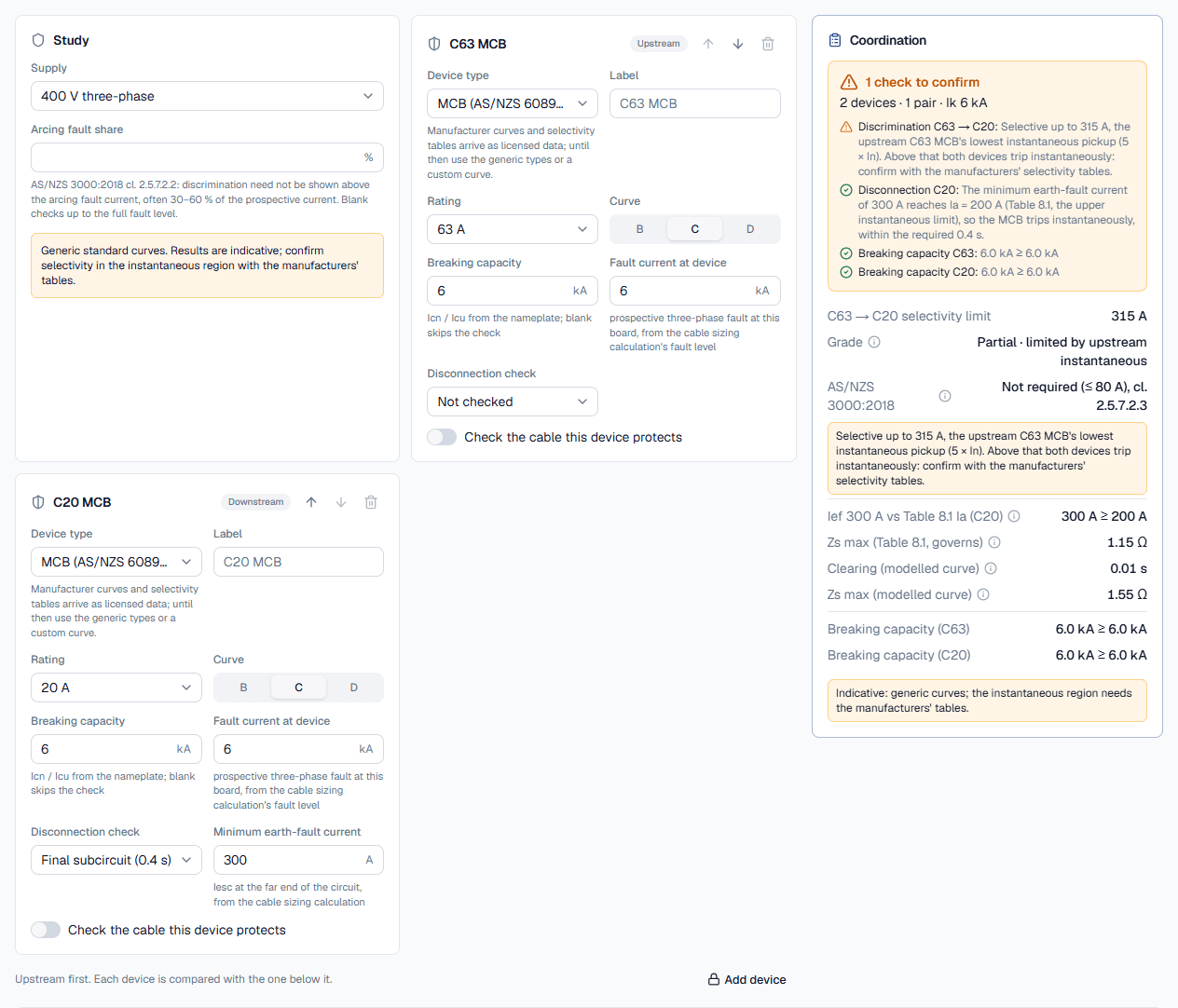
The public page opens with a two-device study (a C63 MCB over a C20 final subcircuit), so there is a result from the first second. Change it to your devices; results recompute on every edit.
- 1
Set the supply and arcing fault share
In the Study card choose the Supply: “400 V three-phase” or “230 V single-phase”. Leave Arcing fault share blank to check discrimination all the way to the full fault level, or enter a percentage to stop at the arcing fault current; the field's hint explains when that is allowed. The amber note under it reminds you the curves are generic.
- 2
Describe each device, upstream first
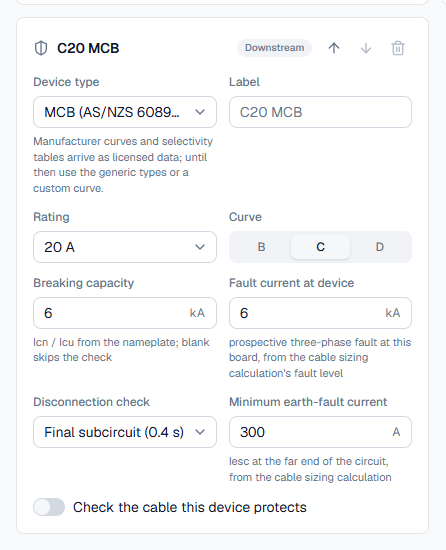
Devices run top to bottom, upstream first; the badge on each card reads Upstream, Level 2 and so on, or Downstream. Pick the Device type: MCB (AS/NZS 60898.1), MCCB thermal-magnetic, Electronic trip unit (LSI), gG fuse (IEC 60269) or Custom curve. The fields follow the type:
- MCB: Rating and Curve (B, C or D).
- MCCB: Rating In, Thermal setting Ir and Magnetic pickup Im.
- Electronic: Frame (MCCB or ACB), Rating In, Long-time pickup Ir and delay tr, then switches for the Short-time stage (S), I²t on and the Instantaneous stage (I), with their pickups and delays, and Short-time withstand Icw.
- gG fuse: Rating.
- Custom: the curve points from a catalogue, as two curves or one curve with a tolerance.
Enter the Breaking capacity in kA (blank skips that check) and the Fault current at device in kA. Use the arrows to reorder devices and Add device below the cards to add another level.
- 3
Add the disconnection and cable checks
On the device that protects a circuit, set Disconnection check to “Final subcircuit (0.4 s)” or “Submain or fixed equipment (5 s)” and enter the Minimum earth-fault current in amps. Turn on Check the cable this device protects and choose the Size, Parallel runs, Conductor and Insulation.
- 4
Read the time-current curves
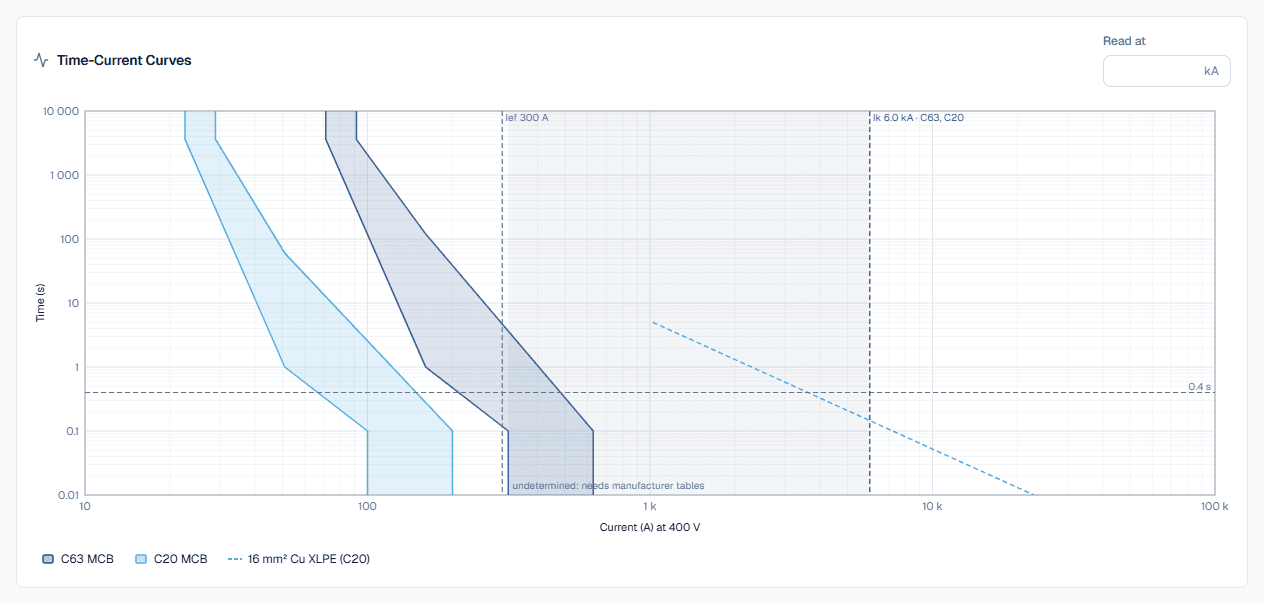
The Time-Current Curves card plots every device as a band between its fastest trip and its slowest clearing, on log-log axes, with each protected cable's damage line. Type a current into Read at (kA) to draw a vertical line and read the times there.
- 5
Read the coordination result
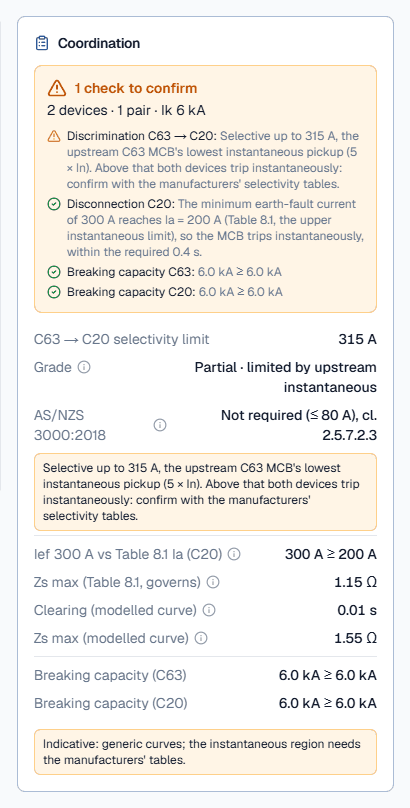
The Coordination card holds the verdicts, explained below. Signed in, you can save the study to a project (the header then shows Save and the Export menu for the PDF report); in a project you can also pre-fill a new study from a cable sizing calculation.
Reading the curves and discrimination results
On the chart, discrimination holds wherever the downstream band sits entirely to the left of and below the upstream band. Where they touch is the selectivity limit. Protection is good where every device band sits below the cable damage line of the cable it protects.
The Coordination card lists one group of rows per check:
- Headline: “Coordination OK (indicative)” when everything passes, otherwise the number of failing checks, with one line per check underneath.
- Selectivity limit for each pair (named like “C63 → C32”), then Grade: Total or Partial and what limits it, such as “the curves overlap” or “limited by upstream instantaneous”. Crossing gives the current and time where the bands meet; for fuses, Energy I²t compares the downstream fuse's operating I²t with the upstream fuse's pre-arcing I²t.
- AS/NZS 3000:2018: the wiring rules' verdict for the pair, printed beside the curve comparison: not required, deemed to comply by rating ratio, or study required.
- Cable: its k²S², the Closest approach of the device's clearing to the cable's withstand, and the Let-through at the fault current.
- Disconnection: for MCBs, the earth-fault current against the operating current Ia of the Table 8.1 row and the resulting Zs max; for other devices, the clearing time against 0.4 s or 5 s.
- Breaking capacity of each device against its fault current.
Worked example: C63 over C32, then two gG fuses
A C63 MCB over a C32 final subcircuit
Set the supply to 230 V single-phase. Device 1: MCB, 63 A, curve C, 6.0 kA at the device. Device 2: MCB, 32 A, curve C, 6.0 kA, disconnection check “Final subcircuit (0.4 s)” with a minimum earth-fault current of 300 A, and the cable check on for 4 mm² copper, PVC (75 °C). Clear both breaking capacity fields to match this example. The headline reads 3 checks fail:
- Discrimination. The C32's slowest clearing meets the C63's fastest trip at about 135 A (5.6 s), so the grade is partial. Above that current, in overload, the C63 might trip first. Yet the AS/NZS 3000:2018 row reads “Not required (≤ 80 A), cl. 2.5.7.2.3”: the wiring rules do not ask for discrimination on a downstream breaker this small. Both answers are right; they answer different questions.
- Cable. The 4 mm² Cu PVC cable has k = 111, so k²S² is 197 136 A²s (0.20 MA²s on the card). At 6.0 kA the let-through is taken as 360 000 A²s (0.36 MA²s) from the generic clearing floor, above the cable's limit. A real current-limiting MCB lets through far less: enter the manufacturer's I²t, or use a larger cable.
- Disconnection. The earth-fault current of 300 A is below Ia = 320 A from Table 8.1 for a C32, so instantaneous tripping is not guaranteed; Zs max (Table 8.1, governs) is 0.72 Ω. The modelled curve would clear in 0.14 s, needing only 238 A (Zs ≤ 0.97 Ω), but for MCBs the calculator lets Table 8.1 govern. Shorten the circuit, increase the cable, or use a B curve.
A gG 200 A fuse over a gG 100 A fuse
Change the supply to 400 V three-phase, set both devices to gG fuse, 200 A over 100 A, each at 10 kA, with no disconnection or cable check. The headline turns to Coordination OK (indicative): the grade is total, selective to 10 kA. The Energy I²t row shows the 100 A fuse's operating I²t of 86 000 A²s within the 200 A fuse's pre-arcing I²t of 104 000 A²s, and the AS/NZS 3000:2018 row reads “Deemed to comply (ratio 2, needs 2), cl. 2.5.7.2.3”.
Best practice and AS/NZS 3000:2018 discrimination
- Treat the result as indicative. Generic bands are wider than any real device. Use the study to find where discrimination is in doubt, then confirm that region with the manufacturers' selectivity tables.
- Enter the fault current at each device, not the supply's fault level everywhere. Fault current falls along each cable, and a lower fault level at the downstream board often turns partial discrimination into total.
- Check all four questions together. A pair that discriminates is no use if the downstream device fails to clear an earth fault in time or lets its cable overheat.
- Use the minimum earth-fault current at the far end of the circuit for the disconnection check, not the prospective fault current at the board.
- Record the settings. For MCCBs and electronic trip units the result is only as good as the dial positions entered; note them in the study description so the installed settings match.
Common coordination mistakes
Listing devices bottom up
The first card is the upstream device. Each device is compared with the one below it.One fault level for the whole study
Use the prospective fault current at each device's own board; the downstream one is usually lower.Reading 'not required' as 'discriminates'
The AS/NZS 3000 row and the curve comparison answer different questions. A pass on one is not a pass on the other.Ignoring the undetermined region
Amber means the generic curves cannot decide. Check the manufacturer's selectivity table before relying on it.Prospective current as the earth-fault current
The disconnection check needs the minimum earth-fault current at the far end of the circuit, which is much lower.Leaving the breaking capacity blank
A blank skips the check. Enter the Icn or Icu from the nameplate so an under-rated device shows up.