

Updated 1 Nov 2026 · Reviewed by Suheib Sherif, electrical engineer
What the earth cable size calculator does
The protective earth carries the fault current back to the source so the protective device can trip. It must be large enough to meet the minimum in AS/NZS 3000:2018 Table 5.1, and large enough not to overheat while it carries the fault. The free earth cable size calculator does both: it reads the Table 5.1 earth size from the active conductors, then, if you give it the earth fault current and clearing time, runs the adiabatic check and raises the earth when the fault needs more copper.
Use the earth cable size calculation when you:
- size the earth for a submain or a single-core feeder where the earth is a separate cable;
- size an earth for parallel runs, which Table 5.1 reads by their total area;
- check whether the earth core in a multicore cable is enough for the fault level at the switchboard.
Before you start: inputs to collect
- Active conductors: multicore or single-core, copper or aluminium, the active size and the number of parallel runs.
- Insulation of the actives: the earth runs with them and starts the fault at their temperature.
- Prospective earth fault current in kA and the protective device's clearing time at that current, for the fault check.
How to size an earth cable in Australia, step by step
- 1
Describe the active conductors
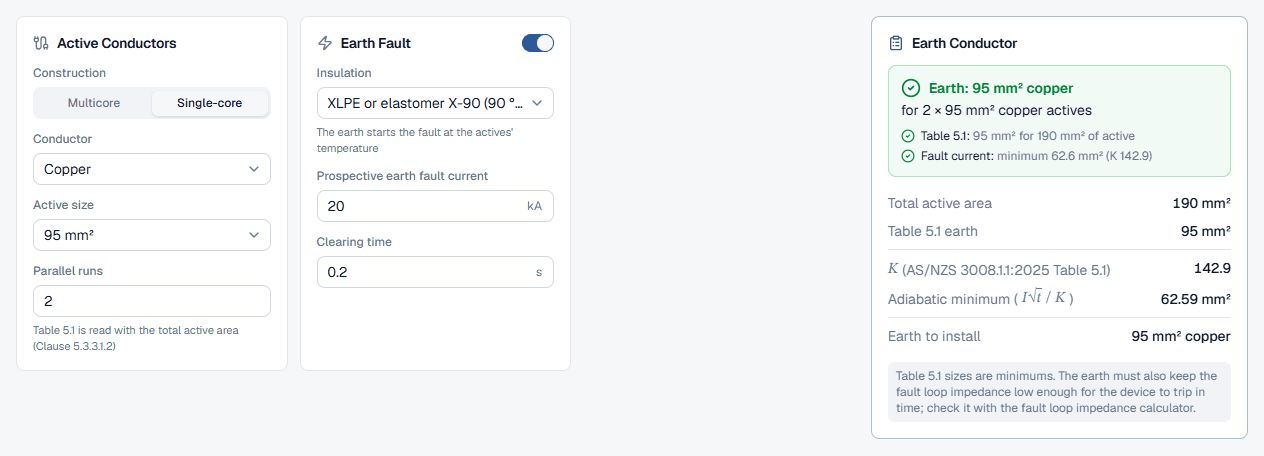
In the Active Conductors card set Construction to Multicore or Single-core and choose the Conductor, Copper or Aluminium. Table 5.1 has a separate column for aluminium actives; the earth it gives is still copper. Pick the Active size and enter the number of Parallel runs. The hint reminds you that Table 5.1 is read with the total active area.
- 2
Turn on the earth fault check
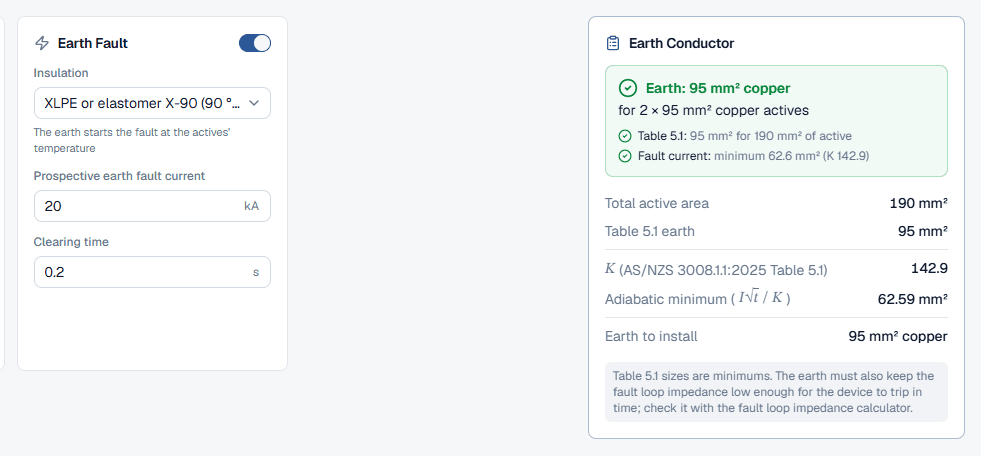
The Earth Fault card has a switch in its header. With it off, the calculator uses Table 5.1 only. Switch it on and three fields appear: Insulation (the actives' insulation, which sets the earth's starting temperature), Prospective earth fault current in kA and Clearing time in seconds.
- 3
Read the earth to install
The Earth Conductor card on the right updates as you type; the next section explains it.
Reading the earth conductor result
The headline is Earth: followed by the size to install, for example 95 mm² copper, with the actives it serves underneath. The checks list shows the Table 5.1 line and, when the fault check is on, a Fault current line with the adiabatic minimum and K, marked governs when it is the larger. Then:
- Total active area: the active size times the parallel runs, the value Table 5.1 is read with.
- Table 5.1 earth: the minimum copper earth for that area.
- and Adiabatic minimum (): shown when the fault check is on.
- Earth to install: the larger of the two, as a standard size.
The grey note is a reminder that the earth also has to keep the fault loop impedance low enough; check that with the fault loop impedance calculator.
Worked examples: Table 5.1 and the fault check
A submain in parallel runs, where Table 5.1 governs
A submain uses 2 × 95 mm² single-core copper cables with X-90 insulation. The earth fault current is 20 kA for 0.2 s. Set Construction to Single-core, Active size and Parallel runs to match, then switch on Earth Fault with XLPE or elastomer X-90 (90 °C) and enter 20 kA for 0.2 s.
Table 5.1 is read with 190 mm² of active, which gives a 95 mm² earth. The fault needs only 62.59 mm² (K 142.9), so the table governs and the earth to install is 95 mm² copper.
A small circuit near a strong supply, where the fault raises the earth
A 16 mm² multicore V-75 copper circuit leaves a board where the earth fault current is 3 kA, cleared in 0.1 s. With Earth Fault off, the calculator gives the Table 5.1 earth of 6 mm² copper. Switch it on with those values and the result changes:
The adiabatic minimum of 8.53 mm² is above the 6 mm² Table 5.1 size, so the fault check governs and the earth to install is 10 mm² copper. If the multicore cable's own earth core is smaller than that, the circuit needs a separate, larger earth, a faster device or a lower fault current at that point.
Best practice and AS/NZS 3000 Table 5.1 references
- The fault check only raises the earth. Table 5.1 is the floor; a low fault current never lets you go below it.
- Start the earth hot. An earth laid up with the actives runs at their temperature, so the calculator starts the fault at the actives' maximum operating temperature.
- Check the fault loop next. A large enough earth for heat can still be too long for the device to trip in time. Run the circuit through the fault loop impedance calculator, or size the whole cable in the cable size calculator, which does all three checks.
- Size earths for aluminium actives from the aluminium column. The earth is copper either way, and the aluminium column gives a smaller earth for the same active size.
Common earth sizing mistakes
Reading Table 5.1 with one run of a parallel group
Enter the number of Parallel runs so the table is read with the total active area, as Clause 5.3.3.1.2 requires.Leaving the Earth Fault check off near the switchboard
Small circuits close to a strong supply are where the adiabatic check raises the earth. Turn it on whenever you know the fault current.Using the copper column for aluminium actives
Set Conductor to Aluminium so the calculator reads the aluminium column.Treating Table 5.1 as the whole answer
The table is a minimum. The fault current and the fault loop impedance can both require a larger earth.