
Updated 1 Nov 2026 · Reviewed by Ahmed Tayeh, electrical engineer
What the maximum demand calculator does
How do you calculate maximum demand? You list the loads, sort them into the load groups of AS/NZS 3000:2018 Appendix C, apply each group's diversity rule, and add the groups on each line of the supply. The free maximum demand calculator does the arithmetic: you choose the installation type, add a row per load group, and it shows the demand on L1, L2 and L3 as you type, with the heaviest line as the maximum demand.
Use it whenever you need the design current of a whole installation or a distribution board:
- sizing the consumer mains, submains and main switch of a house, a block of units or a commercial building;
- checking whether an existing supply can take a new load such as an air conditioner or an EV charger;
- balancing single-phase loads across a three-phase supply;
- a first estimate of a non-domestic building from its floor area, before the loads are known (Table C3).
The answer is a current, not a cable size. Carry it into the cable size calculator to choose the consumer mains, which then checks current rating, voltage drop and fault protection to AS/NZS 3008.1.1:2025.
Before you start: the load schedule
Maximum demand is only as good as the load schedule behind it. Collect these before you open the calculator:
- Installation type. A single dwelling, a block of living units (2 to 5, 6 to 20, or 21 or more), a non-domestic installation (residential institution, factory or shop, commercial office, healthcare facility), or a Table C3 occupancy assessed by floor area.
- Supply. Single-phase, two-phase or three-phase, and the nominal voltage (230/400 V for new work in Australia and New Zealand; 240/415 V where the network is still nominated that way).
- Counts of points. Lighting points and 10 A socket-outlet points. Count each outlet of a double or quad socket-outlet as a separate point.
- Nameplate ratings of every fixed appliance: cooktop and oven (or range), air conditioning or heating (only the larger of the two), water heaters, spa and pool heaters, EV chargers, motors and lifts. kW, W or A are all accepted.
- Which line each load is on, for a multi-phase supply. If the board is not designed yet, a first pass with everything on L1 shows the total; you then spread the loads to balance the lines.
- Floor areas by use (light and power, air conditioning, ventilation and so on), for a Table C3 assessment.
How to calculate maximum demand, step by step
The calculator works the same way for every installation type. The cards and fields below are named as they appear on screen.
- 1
Choose the installation type
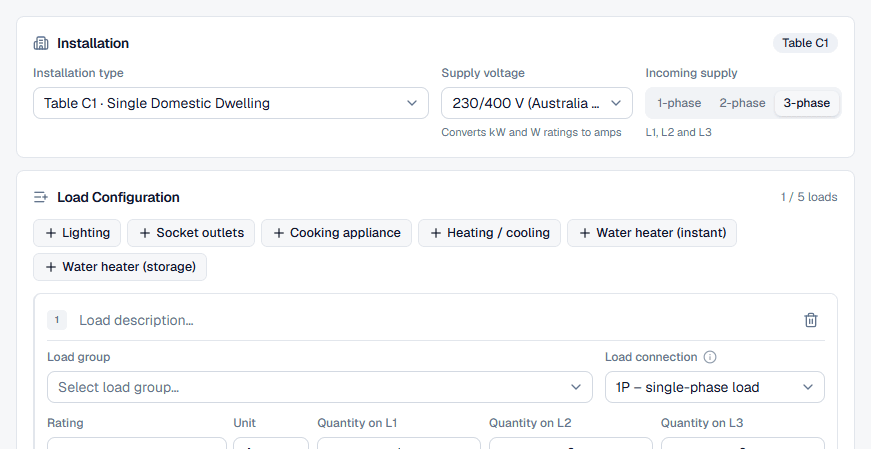
Open the Installation type list in the Installation card. Each option names its table: Table C1 · Single Domestic Dwelling, the three block sizes, the four Table C2 non-domestic types and the seven Table C3 occupancies (offices, carparks, retail shops, warehouses, light industrial, taverns and licensed clubs, theatres). The badge at the top right of the card confirms the table, and the load groups offered in the next card change with it.
The calculator starts on Single Domestic Dwelling. Changing the type later keeps every load that has a group in the new table; if some do not, it asks before removing them.
For a block of living units a Living units field appears. Enter the number of units and the per-unit groups (lighting, socket-outlets, cooking and water heating) start with the units divided over the phases, as Note 2 to Table C1 requires.
- 2
Set the supply voltage and incoming supply
Supply voltage sets how kW and W ratings become amps: single-phase loads at 230 V (or 240 V), line-to-line loads at 400 V (415 V) and three-phase loads at √3 × 400 V (√3 × 415 V). Ratings entered in amps are used as entered.
Incoming supply is a three-way tab, 1-phase, 2-phase or 3-phase, and it starts on 3-phase. Pick the real supply before you enter loads: the hint underneath shows which lines are in play (L1 only; L1 and L2; L1, L2 and L3), and each load row gets one quantity field per line. Switching to 1-phase moves every quantity onto L1.
- 3
Add a row for each load group
The Load Configuration card holds one row per load group. For Table C1 the quick-add buttons are Lighting, Socket outlets, Cooking appliance, Heating / cooling, Water heater (instant) and Water heater (storage); for Table C2 they are Lighting, Socket outlets, Appliances, Motor and Thermal storage. Anything else goes through the Add load button and the Load group list, which names every group of the table in its own words.
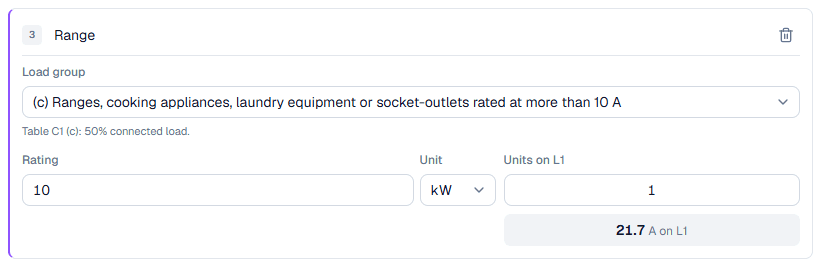
Once a group is picked, the hint under it states the rule, for example Table C1 (c): 50% connected load. Give the row a name in Load description… so the PDF report reads well. The counter on the card shows how many rows you have used; the public calculator takes up to 5.
- 4
Enter the rating and the quantity on each line
What a row asks for depends on its group. Lighting (a)(i) and 10 A socket-outlets (b)(i) are counted in points, so they show only Points on L1 (and L2, L3) and the hint ends with No rating needed. Rated groups such as a range, air conditioning or a water heater show Rating with a Unit of A, kW or W, plus Units on L1: the number of identical appliances on that line.
On a 2-phase or 3-phase supply each row also has Load connection: 1P – single-phase load, 2P – line-to-line (L1–L2) or 3P – three-phase load. A 3P load sits on all three lines; turn on Unequal rating per line when its lines are not balanced. Under every row a chip per line shows the demand that row adds, after diversity, so you can see each group's rule at work.
- 5
Enter floor areas for a Table C3 assessment
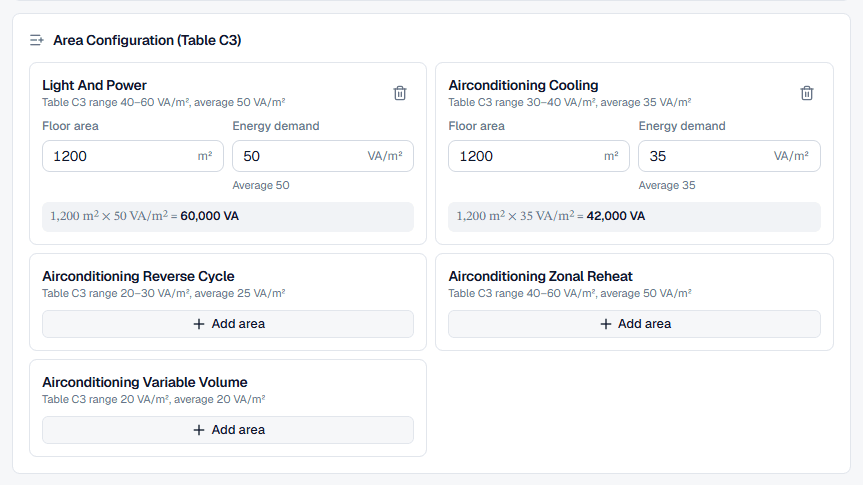
Pick a Table C3 occupancy and the load rows give way to Area Configuration (Table C3). Each component shows its Table C3 range and average, for example Table C3 range 40–60 VA/m², average 50 VA/m² for office light and power. Press Add area, enter the Floor area in m², and keep the average in Energy demand or type a figure within the range that suits the building. A line under the fields shows area × VA/m² = VA. Special equipment in warehouses and light industrial takes its load directly in VA (Add equipment).
- 6
Read the demand on each line
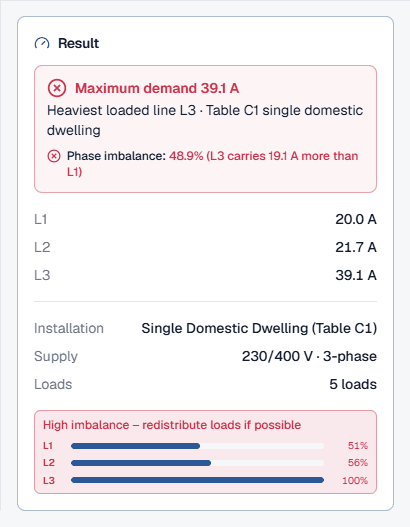
The Result card updates as you type. The next section explains each line of it.
- 7
Save, export or size the consumer mains
On the public page anyone can export a watermarked PDF from Export, and Sign up to save creates a free account. Signed in, the calculator opens inside a project: name and describe the calculation in the header, and it saves a few seconds after each change (or with Save). Export then offers Download PDF and Preview and print, and Size the mains opens a new cable sizing calculation with the maximum demand, rounded up to the next amp, as its load (with 230 V for a single-phase supply, 400 V for three-phase).
Reading the maximum demand result
The Result card reads from the top down:
- The headline, Maximum demand … A, is the current on the heaviest loaded line. That is the figure the consumer mains and main switch must carry.
- The subtitle says where it comes from: Single-phase supply, or Heaviest loaded line L… on a multi-phase supply, then the table and installation type. For Table C3 it shows the total VA and the number of lines it is spread over.
- Phase imbalance (2-phase and 3-phase supplies) compares the heaviest and lightest lines, for example 48.9% (L3 carries 19.1 A more than L1). Up to 10% reads Balanced, up to 20% Slight imbalance, up to 30% Moderate imbalance; above 30% the check fails with High imbalance – redistribute loads if possible. These bands are the calculator's guidance, not limits from AS/NZS 3000. Table C3 spreads its VA evenly, so it has no imbalance.
- L1, L2, L3: the demand on each line of the supply, then the installation, the supply and the number of load rows the result rests on. Table C3 adds Total demand in VA.
Worked example: maximum demand of a house
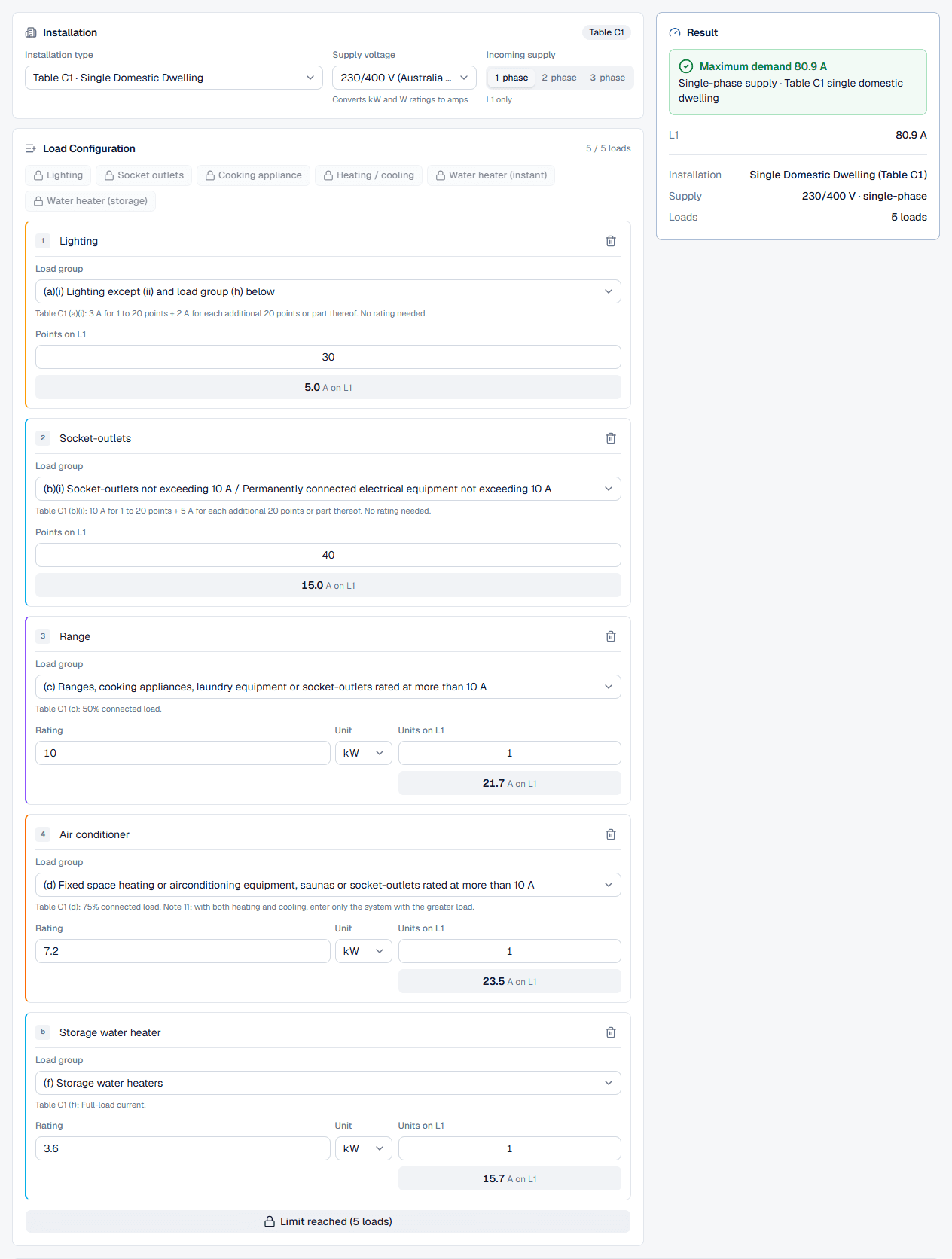
A single domestic dwelling on a single-phase 230 V supply, assessed with Table C1. Choose Table C1 · Single Domestic Dwelling, set Incoming supply to 1-phase, and enter five rows, which is exactly the free limit:
How each row gets its figure:
- Lighting (a)(i): 3 A for 1 to 20 points + 2 A for each additional 20 points or part thereof, so 30 points give 5.0 A.
- Socket-outlets (b)(i): 10 A for 1 to 20 points + 5 A for each additional 20 points or part thereof, so 40 points give 15.0 A.
- The range (c) draws 43.5 A at 230 V and the rule is 50% connected load: 21.7 A.
- The air conditioner (d) draws 31.3 A; at 75% connected load it adds 23.5 A.
- The storage water heater (f) takes full-load current: 15.7 A.
The Result card shows Maximum demand 80.9 A with the subtitle Single-phase supply · Table C1 single domestic dwelling. The three rated appliances alone would draw 90.4 A at full load; Appendix C brings them to 60.9 A. Size the consumer mains and main switch for at least 81 A, then check the supply authority's service rules for the largest single-phase service it will connect.
The same house on a three-phase supply
Now set Incoming supply to 3-phase and put each row's quantity on the line it is wired to. As first drawn, lighting and sockets share L1, the range is on L2, and the air conditioner and water heater are both on L3:
The first arrangement fails the imbalance check: L3 carries 19.1 A more than L1. Moving the water heater to L1 and the lighting to L2 (30 lighting points on L2, 40 × 10 A socket-outlet points on L1, 10 kW range on L2, 7.2 kW split system air conditioner on L3, 3.6 kW storage water heater on L1) brings the heaviest line down to 30.7 A. The installation is the same; only the line each load sits on changed, and with it the current the mains must carry.
A floor-area estimate with Table C3
For an office whose loads are not yet known, choose Table C3 · Offices on a 3-phase supply and add two areas at the table averages:
The 102,000 VA is spread evenly over the three lines at 230 V, so the Result card reads Maximum demand 147.8 A, 147.8 A on each of L1, L2 and L3. Replace it with a Table C2 assessment once the load schedule exists.
Best practice and AS/NZS 3000 Appendix C references
Getting maximum demand right matters in both directions. Undersized consumer mains overheat and the main switch nuisance-trips; oversized ones cost more in cable, switchgear and network charges. Appendix C exists to land between the two: it assumes realistic diversity, not everything at full load at once.
Which Appendix C table to use
- Table C1: single domestic dwellings and blocks of living units, with separate columns for 2 to 5, 6 to 20 and 21 or more units. Loads are grouped by type and each group has its own rule.
- Table C2: non-domestic installations by load group. Residential institutions have their own rules; factories, shops, offices and healthcare facilities share another set.
- Table C3: the energy demand method, floor area × VA/m², for non-domestic buildings assessed before the loads are known.
Table C1 load groups for a single dwelling
The rules the calculator applies to a single domestic dwelling, group by group, as its hints state them:
Notes that change the count
- Heating or cooling, not both (Table C1 Note 11): where an installation has air conditioning and heating, only the system with the greater load is counted.
- 15 A and 20 A socket-outlets (Table C1 Note 10): with both installed, the allowance is 15 A, not one allowance per type.
- Living units over the phases (Table C1 Note 2): in a block, the units are divided over the supply phases and the column is chosen by units per phase.
- Multiple socket-outlets: a double socket-outlet counts as two points and a quad as four. Lighting track counts as two points per metre of track. Both come from the notes to Table C1.
Two habits keep a maximum demand calculation defensible: keep the load schedule (the PDF report lists every row with its group and rule), and recalculate when loads are added. An EV charger, an extra split system or a pool heater can move a house from one service size to the next.
Common maximum demand mistakes
Adding up nameplates
The sum of every rating is the connected load, not the maximum demand. Enter each load in its group and let the Appendix C rules apply the diversity.Leaving the supply on 3-phase
The calculator starts on 3-phase. For a single-phase house switch Incoming supply to 1-phase first, or the result reports an imbalance that does not exist.Counting fittings instead of points
A double socket-outlet is two points. Counting fittings halves the socket-outlet group and understates the demand.Entering heating and cooling
Only the larger of the two systems counts (Table C1 Note 11). Two rows double-count the same load.Wrong load connection
A 2.4 kW load entered as 2P is converted at 400 V and appears on both L1 and L2. Use 1P for single-phase appliances and 3P only for true three-phase loads.Treating the result as a cable size
Maximum demand is the design current. The consumer mains still need sizing for derating, voltage drop and fault protection in the cable size calculator.Using Table C3 when the loads are known
The floor-area method is an early estimate. Once the load schedule exists, assess the installation with Table C2.