

Updated 1 Nov 2026 · Reviewed by Ahmed Tayeh, electrical engineer
What the cable pulling calculator does
The free cable pulling calculator works out the pulling tension along a conduit route, section by section, and the sidewall bearing pressure at every bend, using the equations of IEEE Std 1185-2019. It checks both against the limits of the cables you are pulling and draws the route in plan, elevation and 3D, coloured by how close each section comes to a limit.
Run a cable pulling tension calculation before the pull, not after a cable is damaged:
- to decide whether a run can be pulled in one go or needs a pit or pull point part way;
- to choose which end to feed the cable in from;
- to confirm that the conduit size and bend radius suit large single-core or multicore power cables;
- to give the crew a target tension for the winch and a figure for any hold-back on downhill sections.
It assumes the conduit is already chosen. To size the conduit for the cables first, use the conduit size calculator.
Before you start: cable data and the route
Gather these before you start; the calculator cannot guess them:
- Cable data from the manufacturer: overall diameter (mm), weight per metre (kg/m), the maximum pulling tension per cable (kN) and the maximum sidewall pressure (N/m). The tension limit depends on how the cable is gripped; use the figure for your pulling eye or stocking.
- Conduit: its inside diameter (the bore, not the nominal size) and the radius of its bends.
- Route: every straight, slope and bend in order, with lengths in metres and angles in degrees. Pit-to-pit drawings or a site walk with a measuring wheel both work.
- Friction: the coefficient for your cable jacket, conduit and lubricant, ideally from the lubricant maker.
Step by step: calculating cable pulling tension
The public page opens with an example pull already loaded, so every card has values from the start. Edit it, or press New in the header to clear the route and start from a default cable.
- 1
Describe the cables
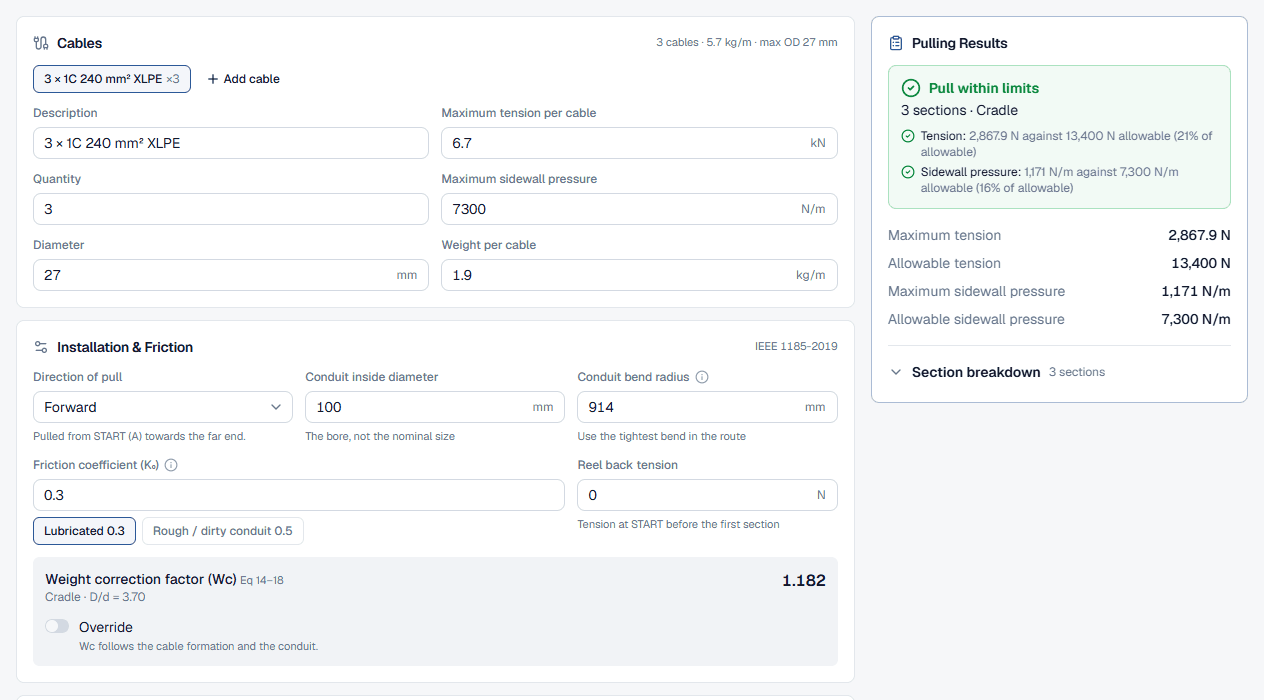
The Cables card edits one cable type at a time, picked from the chips at the top; Add cable adds another type for a mixed pull. For each fill in the Description, Maximum tension per cable (kN), Quantity, Maximum sidewall pressure (N/m), Diameter (mm) and Weight per cable (kg/m). The card header totals the cable count, the combined weight and the largest diameter, which is what the equations use.
- 2
Set the installation and friction
In Installation & Friction set the Direction of pull: Forward pulls from START (A), where the route begins, towards the far end; Reverse pulls the other way. Enter the Conduit inside diameter and the Conduit bend radius (the tightest bend on the route). Type the Friction coefficient (K₀) or click a preset, “Lubricated 0.3” or “Rough / dirty conduit 0.5”. Add Reel back tension if the drum is braked.
The grey panel below shows the Weight correction factor (Wc), worked out from the cable formation and the ratio of conduit bore to cable diameter (D/d). Leave it on automatic unless you have a reason to override it. Watch for the two warnings here: a conduit not larger than the largest cable, and a D/d between 2.8 and 3.2, where three cables can jam in a bend.
- 3
Build the route in pull order
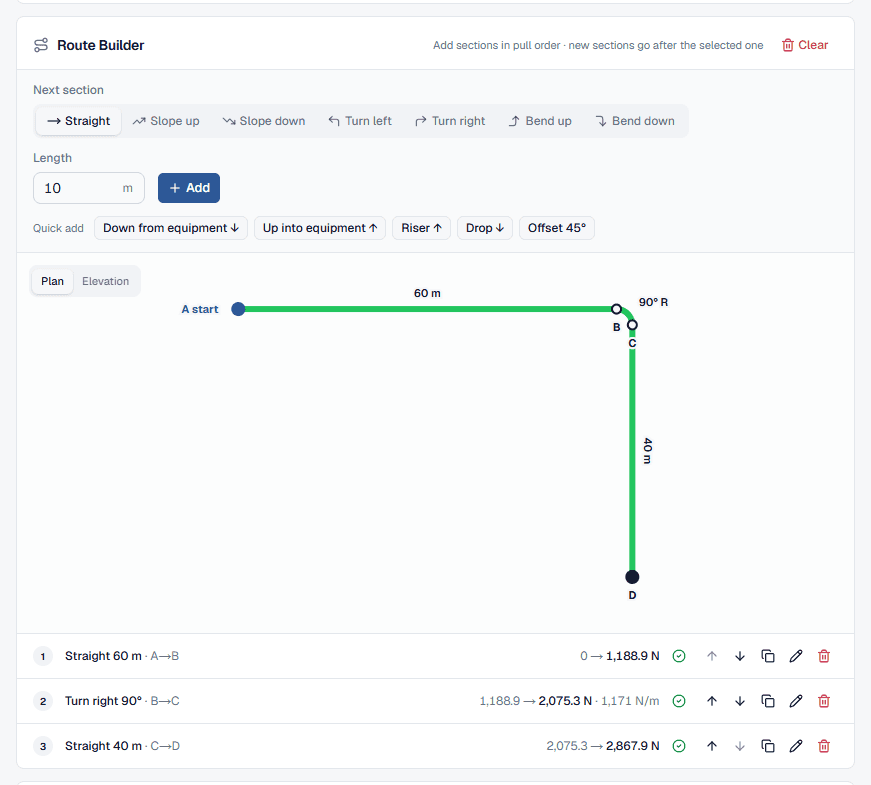
The Route Builder adds sections in pull order. Under Next section pick what the cable does next: Straight, Slope up, Slope down, Turn left, Turn right, Bend up or Bend down. Runs take a Length in metres; slopes and bends take an Angle, with common angles one click away (90°, 45°, 30° and 22.5° for bends) and an Other field for anything else. Press Add or Enter.
The Quick add buttons insert common shapes in one click: Down from equipment, Up into equipment, Riser, Drop and Offset 45°. Click a section in the list or the drawing to edit it, give it a note such as “pit 3 to pit 4”, move it, duplicate it or delete it. Select a section and new ones are inserted after it. The drawing switches between Plan and Elevation, and the 3D Route View below can play the pull from start to finish.
- 4
Check the tension profile and compare directions
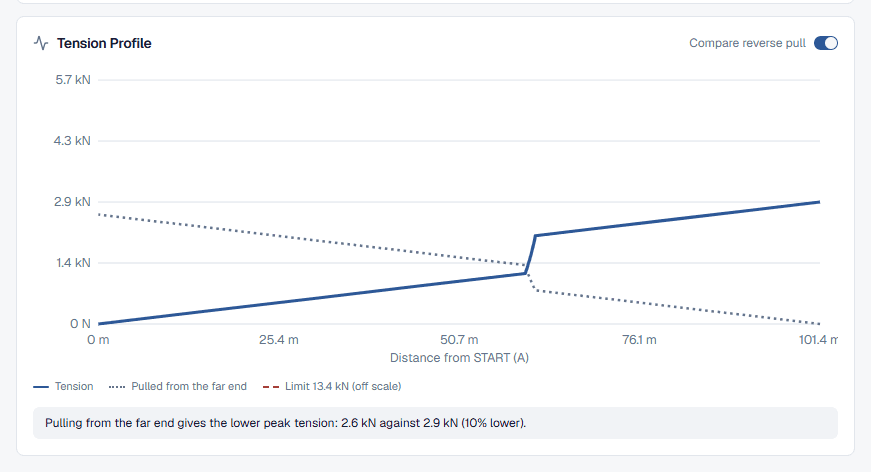
The Tension Profile plots tension against distance from START (A). The dashed red line is the allowable tension; amber dots mark bends with high sidewall pressure and red dots bends over the limit. Turn on Compare reverse pull and the same route pulled from the other end is drawn dotted, with a line saying which direction peaks lower and by how much.
- 5
Read the pulling results
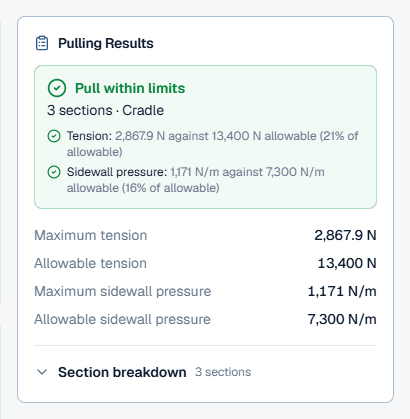
The Pulling Results card summarises the pull, explained below. Underneath the calculator, Worked Calculations shows every equation with your numbers, which is what a reviewer will ask for. On the public page the Export menu offers “Download PDF (watermarked)” of the pull on screen once the route has a section.
Reading pulling tension and sidewall pressure
- Headline: “Pull within limits” when both checks pass, otherwise the number of failing checks. The subtitle gives the section count and the cable formation.
- Tension check: the highest tension anywhere in the pull against the Allowable tension, with the percentage used. The allowable is the per-cable rating scaled for the number of cables: × the count for one or two cables, × 2 for three, and × 0.8 × the count for four or more, because tension does not share evenly between three or more cables.
- Sidewall pressure check: the highest bearing pressure at any bend against the lowest Allowable sidewall pressure of the cables in the pull.
- Notes: a slope change with no bend (insert the bend), a section that needs hold-back and its force, or a dip worked with the cable resting on the duct floor.
- Section breakdown: open it to see each section's tension in and out, the sidewall pressure at bends and a pass or fail per section.
On the route drawing and in 3D, green sections are within limits, amber ones are over 80 % of a limit and red ones fail. An amber section is a warning that a slightly higher friction than you assumed could tip it over.
Worked example: which end to pull from
The example loaded on the public page pulls 3 single-core cables (3 × 1C 240 mm² XLPE, 27 mm, 1.9 kg/m each, rated 6.7 kN and 7,300 N/m) through a 100 mm conduit: 60 m straight, a 90° turn of 914 mm radius, then 40 m straight, lubricated at K₀ = 0.3.
The installation card reports a cradle formation with D/d = 3.70, safely outside the jam range, and Wc = 1.182. Pulled forward, the results card shows:
- maximum tension 2,867.9 N against 13,400 N allowable (21% of allowable);
- maximum sidewall pressure 1,171 N/m against 7,300 N/m (16% of allowable).
The pull passes with room to spare. Now switch on Compare reverse pull. Pulled from the far end, the cable meets the bend after 40 m instead of 60 m, so less tension is multiplied by the bend. The peak drops to 2,572.4 N, 10% lower, and the sidewall pressure to 780.7 N/m. Feeding from the end nearer the bend is the better choice.
Finally click the “Rough / dirty conduit 0.5” preset. The forward pull rises to 6,335.4 N (47% of allowable) and the bend to 2,829.4 N/m (39% of allowable). It still passes, but the jump shows why lubrication and a clean conduit matter more than almost any other input. The tool page's how it's calculated section works the forward pull equation by equation.
Best practice and IEEE Std 1185-2019
- Feed the cable in at the end nearest the bends. A bend multiplies the tension entering it, so bends met early, while tension is low, add the least. Compare reverse pull answers it for your route.
- The manufacturer's limits govern. The calculator starts with typical figures for a large single-core cable. Replace them with the datasheet values for the actual cable and pulling method.
- Enter the tightest bend radius, and check it is not below the cable's minimum bending radius.
- Allow for friction you cannot see. Work the pull at the lubricated figure and again at a rough-conduit figure. If the rough case fails, plan an intermediate pull point or a larger conduit.
- Keep D/d out of the jam range for three single cores; the calculator warns when it falls between 2.8 and 3.2.
- Give the crew the numbers. Set the winch's tension limit below the allowable, and plan hold-back where the results card asks for it.
Common cable pulling mistakes
Entering the nominal conduit size
Use the inside diameter. The bore sets D/d, the cable formation and the weight correction factor.Adding sections out of order
The route builder works in pull order from START (A). A bend listed in the wrong place sees the wrong tension.Changing slope without a bend
Every change of slope needs a vertical bend. Leave it out and the tensions are understated; the results card warns you.Mixing tension units
Maximum tension per cable is in kN; the results are in N. A 6.7 kN rating is 6,700 N per cable.Using the total weight as the weight per cable
Weight per cable is one cable, in kg/m. The calculator multiplies by the quantity itself.Trusting the default friction
0.3 assumes a well-lubricated pull. A dry or dirty conduit is much higher.